The “Productivity analytics” report shows how long the merged merge requests of a group took to merge, which stages of their life took that time, and how large the changes were. The page holds a histogram of the merge requests by the selected measure, a scatter chart of the same merge requests by merge day with a rolling median, and a table of the merged merge requests of the period. The report is available for a group.
Report availability
The report is available to members of a group with the “Reporter” role and above, including those who hold that role in a parent group, and to users of the “Auditor” type. Members with the “Guest” or “Planner” role and visitors of a public group do not see the menu item, and the address answers 404 for them.
The report covers only the projects whose merge requests the reader can see: a project the reader has no access to, or one whose merge requests are hidden from the reader, stays out of the numbers.
Viewing the report
To view the report:
- In the top bar, select “Search or go to…” and pick the group.
- In the group menu, go to “Analyze” → “Productivity analytics”.
The report is also available at a direct address:
| Report | Address |
|---|---|
| Group | https://<HOST>/groups/<GROUP>/-/analytics/productivity_analytics |
What reaches the report
The report counts the merged merge requests of the projects of the group and of the projects of its subgroups, including archived projects, whose merge date falls within the reporting period. Open merge requests and merge requests closed without merging are absent from the report.
The merge date is taken in UTC, and the days of the charts are UTC days.
The time measures are counted from the opening of the merge request: a merge request opened before the period and merged inside it is counted in full. A merge request whose merge time matches its opening time or precedes it stays out of the report.
The dates of the first and last commit, the number of commits, the number of changed lines and the number of changed files are recorded from the changes of the merge request when it is opened and after every push to its source branch. A merge request whose changes were pushed before the instance started recording these columns has them empty until an administrator fills them as described in Filling the columns for existing merge requests.
Measures
The “Measure” list sets the measure of the histogram and of the vertical axis of the scatter chart. The list opens on “Days from open to merge”.
| Measure | Content | Histogram columns |
|---|---|---|
| “Days from open to merge” | Whole days from the opening of the merge request to its merge | One column per number of days that has merge requests; there is no shared column for the tail, so a merge request merged after a year is a column of its own at 365 |
| “Open to first comment” | Time from the opening of the merge request to the first comment | <1h, 1-3h, 3-6h, 6-12h, 12-24h, 24-48h, 48h+ |
| “First comment to last commit” | Time from the first comment to the last commit | The same spans in hours |
| “Last commit to merge” | Time from the last commit to the merge | The same spans in hours |
| “Commits in the merge request” | Number of commits | 0 to 19, then 20+ |
| “Lines changed per commit” | Changed lines divided by the number of commits | <10, 10-25, 25-50, 50-100, 100-250, 250-500, 500+ |
| “Files changed” | Number of changed files | 0 to 19, then 20+ |
A merge request the measure says nothing about is left out of the histogram and the scatter chart: one that was never commented on, for “Open to first comment” and “First comment to last commit”; one whose last commit precedes its first comment, for “First comment to last commit”; one whose commit columns are empty, for every measure that reads the commits; one without commits, for “Lines changed per commit”.
Histogram
The histogram is titled with the selected measure. Each column holds the merge requests of the period that fall into it; the horizontal axis is named by the unit of the measure (“Days”, “Hours”, “Commits”, “Lines” or “Files”), the vertical axis “Merge requests”.
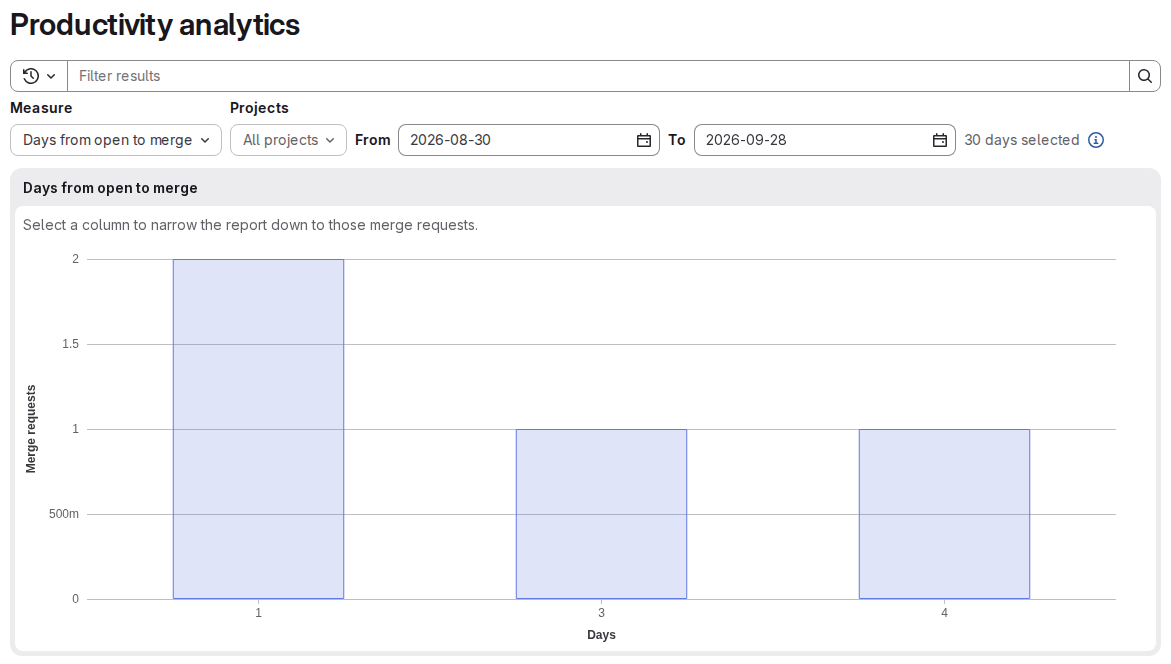
Selecting a column narrows the scatter chart, its median and the table to the merge requests of that column; the other columns are shown translucent. Several columns can be selected; selecting a column again drops it, and the “Clear the selected columns” button above the chart drops all of them. The line under the chart names the selection: The merge requests below are those of 2 selected columns. Changing the measure clears the selection.
When the period and the filters leave no merged merge requests, the chart is replaced with the message “No merge requests were merged in this period” and the hint “Widen the date range or pick different projects to see the spread of merge times.”
Merge requests over time
The “Merge requests over time” chart shows one point per merged merge request: the horizontal axis “Merged” holds every day of the period, including the days without merges, and the vertical axis holds the selected measure.
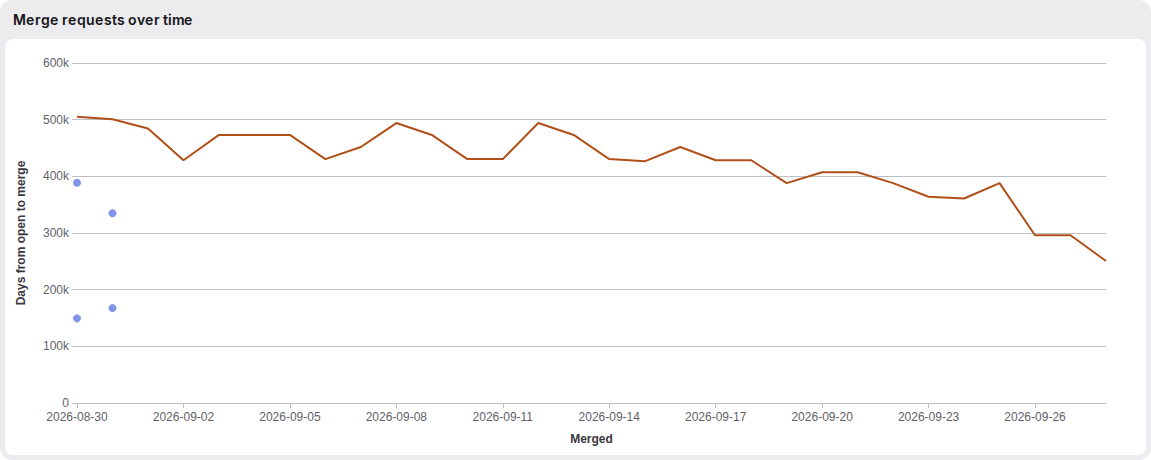
The vertical axis of a time measure counts seconds, whatever the unit in the name of the measure: “Days from open to merge” places a merge request merged after four days near 350k. The histogram and the table of the same measure count days.
The line “
The chart holds up to 2000 points, starting with the most recently merged. With more merge requests in the period, the line under the chart reads Showing the latest 2000 of 3125 merge requests.; the histogram and the table count all of them.
Reporting period
The period opens on the last 30 days, including the current one, and spans at most 90 days, counting both ends. The period is set in the “From” and “To” fields; the end date is no later than the current day, and the picker offers no wider range. The line next to the fields counts the days: 30 days selected.
The period is not kept in the address of the page: a link opens on the last 30 days.
Filters
The “Projects” list narrows the report to the selected projects of the group and its subgroups. It opens on “All projects”, accepts several projects, offers a search, and “Clear all” returns it to all projects. With projects selected, the list reads 3 projects selected. The selected projects are not kept in the address of the page.
The filter bar above the charts narrows the histogram, the scatter chart and the table at once:
- “Author” — one author;
- “Label” — one or several labels; the report keeps the merge requests that carry all the selected labels;
- “Milestone” — one milestone; “None” keeps the merge requests without a milestone, “Any” those with one.
The filters accept the = operator only.
The measure, the sort order, the selected columns and the filters are kept in the address of the page, so a configured report can be shared as a link:
https://<HOST>/groups/<GROUP>/-/analytics/productivity_analytics?metric=TIME_TO_MERGE&sort=DAYS_TO_MERGE_DESC&buckets[]=2A link opens on the last 30 days and all projects, and a value the report does not offer falls back to the default.
Merged merge requests table
The “Merged merge requests” table lists the merged merge requests of the period, one row per merge request with every measure, starting with the most recently merged. The table shows 20 rows; the “Show more” button below it adds the next 20.
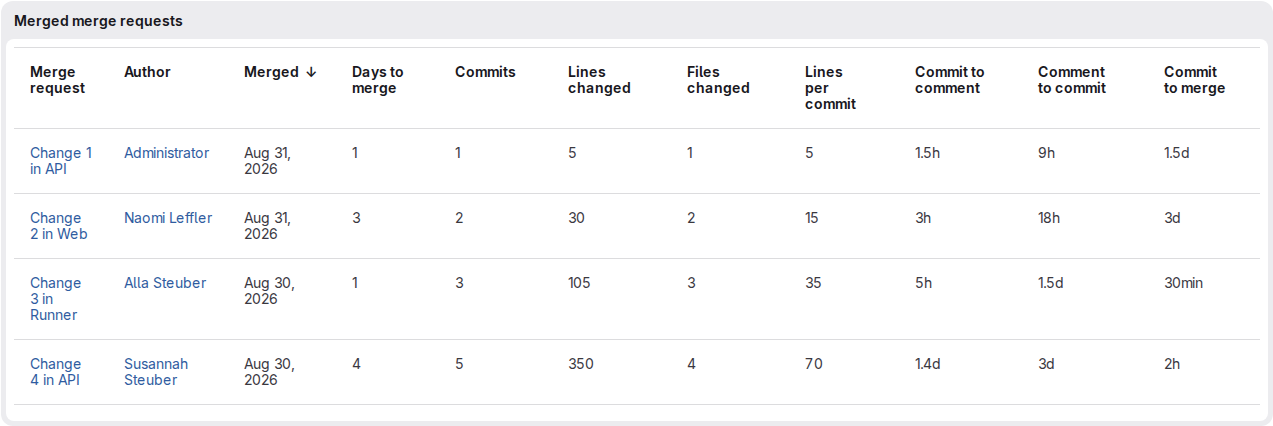
Selecting the header of a measured column sorts the table by it in either direction; the “Merge request” and “Author” columns are not sortable. A merge request the column says nothing about has an empty cell and sorts last in either direction.
| Column | Content |
|---|---|
| “Merge request” | Title with a link to the merge request |
| “Author” | Author of the merge request, with a link to the profile |
| “Merged” | Date of the merge |
| “Days to merge” | Whole days from the opening of the merge request to its merge |
| “Commits” | Number of commits |
| “Lines changed” | Number of changed lines |
| “Files changed” | Number of changed files |
| “Lines per commit” | Changed lines divided by the number of commits, to two decimal places |
| “Commit to comment” | Time from the opening of the merge request to the first comment |
| “Comment to commit” | Time from the first comment to the last commit; empty when no commit followed the first comment |
| “Commit to merge” | Time from the last commit to the merge |
The time columns show an abbreviated value: 30s, 45min, 2.5h, 3d.
Filling the columns for existing merge requests
The columns read from the changes of a merge request — “Commits”, “Lines changed”, “Files changed”, “Lines per commit”, and the dates of the first and last commit behind “Comment to commit” and “Commit to merge” — are filled for the existing merge requests by a task run from the console of the instance. The task takes every merge request that has changes and reads their latest version; a merge request without changes is skipped. GROUP=<GROUP> limits the task to the projects of one group and its subgroups, where <GROUP> is the full path of the group; without GROUP, the task takes every merge request of the instance. A path that names no group stops the task with No group at <GROUP>.
- Linux package
- Omnibus Docker
- Helm Chart
- Deckhouse Kubernetes Platform module
sudo gitlab-rake fe:analytics:backfill_merge_request_metrics GROUP=<GROUP>docker exec code gitlab-rake fe:analytics:backfill_merge_request_metrics GROUP=<GROUP>d8 k -n code exec deploy/code-toolbox -- gitlab-rake fe:analytics:backfill_merge_request_metrics GROUP=<GROUP>d8 k -n d8-code exec -it -c toolbox deploy/toolbox -- gitlab-rake fe:analytics:backfill_merge_request_metrics GROUP=<GROUP>The task queues a background job per merge request and prints Enqueued a metrics refresh for 1250 merge requests; the columns fill as the jobs run. A job for a merge request that received a push in the meantime does nothing: the push recorded the columns itself. A repeated run rewrites the columns from the latest changes.