Static Application Security Testing (SAST) in Deckhouse Code looks for vulnerabilities in the source code of a project. The scanner behind it is Opengrep, and the scan is called opengrep_sast.
The scan is mandated: it is added to a project’s pipeline by a scan execution policy that lives in a separate security policy project, not by the project’s own .gitlab-ci.yml. The policy — that is, the security team — decides what is scanned and what fails the pipeline, and the scanned project cannot override it from its own CI/CD settings.
What the scan does
The opengrep_sast scan adds the jobs opengrep_sast_scan and opengrep_sast_junit to the pipeline, both in the fe-security-scanner stage:
| Job | What it does |
|---|---|
opengrep_sast_scan | Runs the scanner over the repository and publishes its raw JSON output as the opengrep-scan/ artifact. Its log names the engine and the analyzer image that ran, the rule set path with the number of rules it holds, how many rules ran and how many files were read. |
opengrep_sast_junit | Reads that JSON, builds a JUnit test report and a security report from it, and decides the outcome: the job succeeds when no finding reaches the blocking threshold, and fails otherwise. It runs on a Ruby image. |
In the pipeline each job carries the policy that mandated it in its name: opengrep_sast_scan:<policy name as a slug>-p<id of the policy project>. A group policy and a project policy that both mandate the scan produce a pair of jobs each.
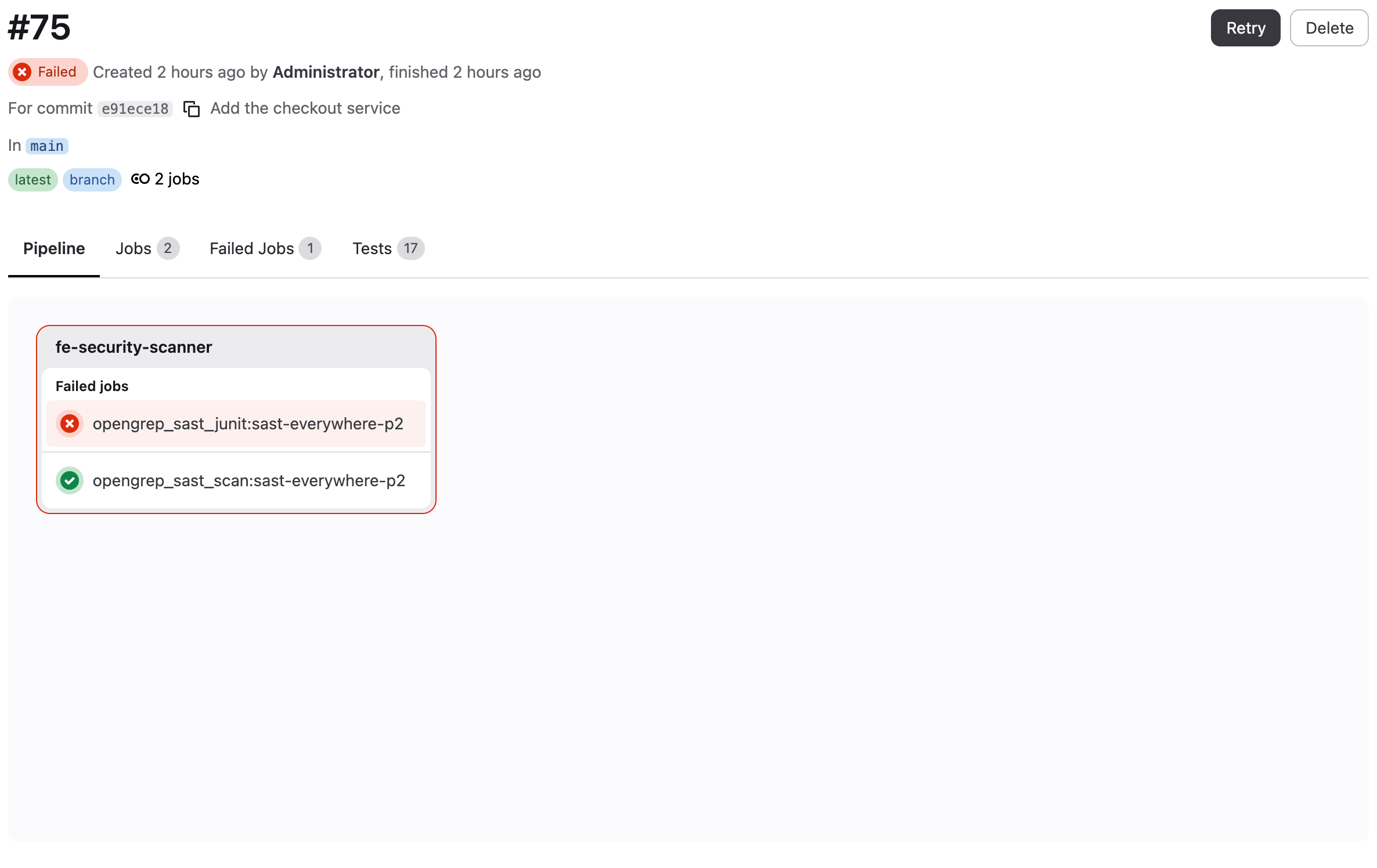
Both jobs upload their artifacts with when: always, so a blocked pipeline still carries the findings that blocked it.
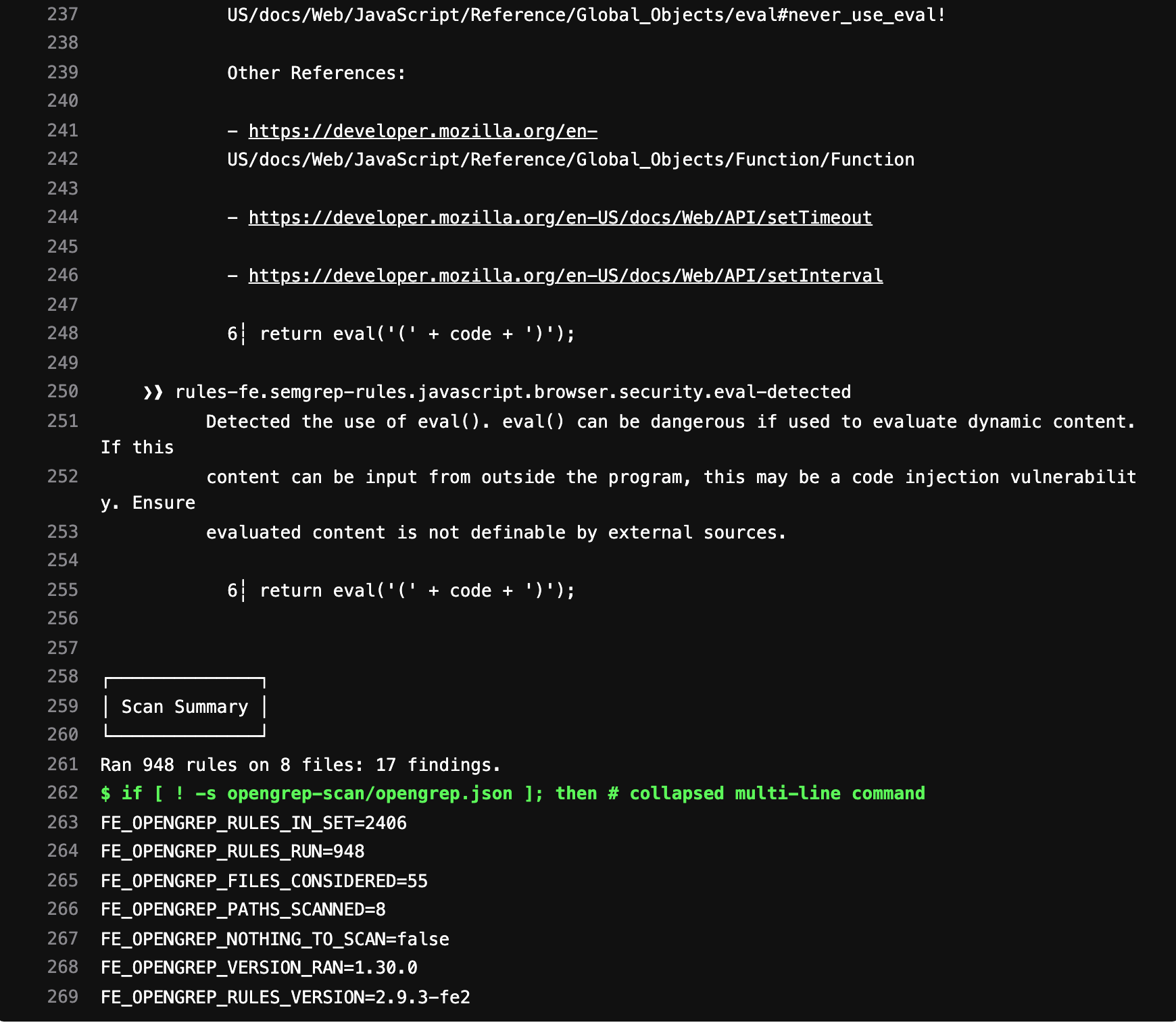
A repository whose files are all in languages the rule set does not cover ends the scan job with the log line Opengrep: nothing was scanned, so this run publishes no report.; both jobs succeed and no report is published, so nothing downstream reads an empty report as findings fixed.
Findings reach the same places as those of every other policy scanner:
| Report | Where to view |
|---|---|
| Tests (JUnit) | “Tests” tab of the pipeline and the test summary in the merge request |
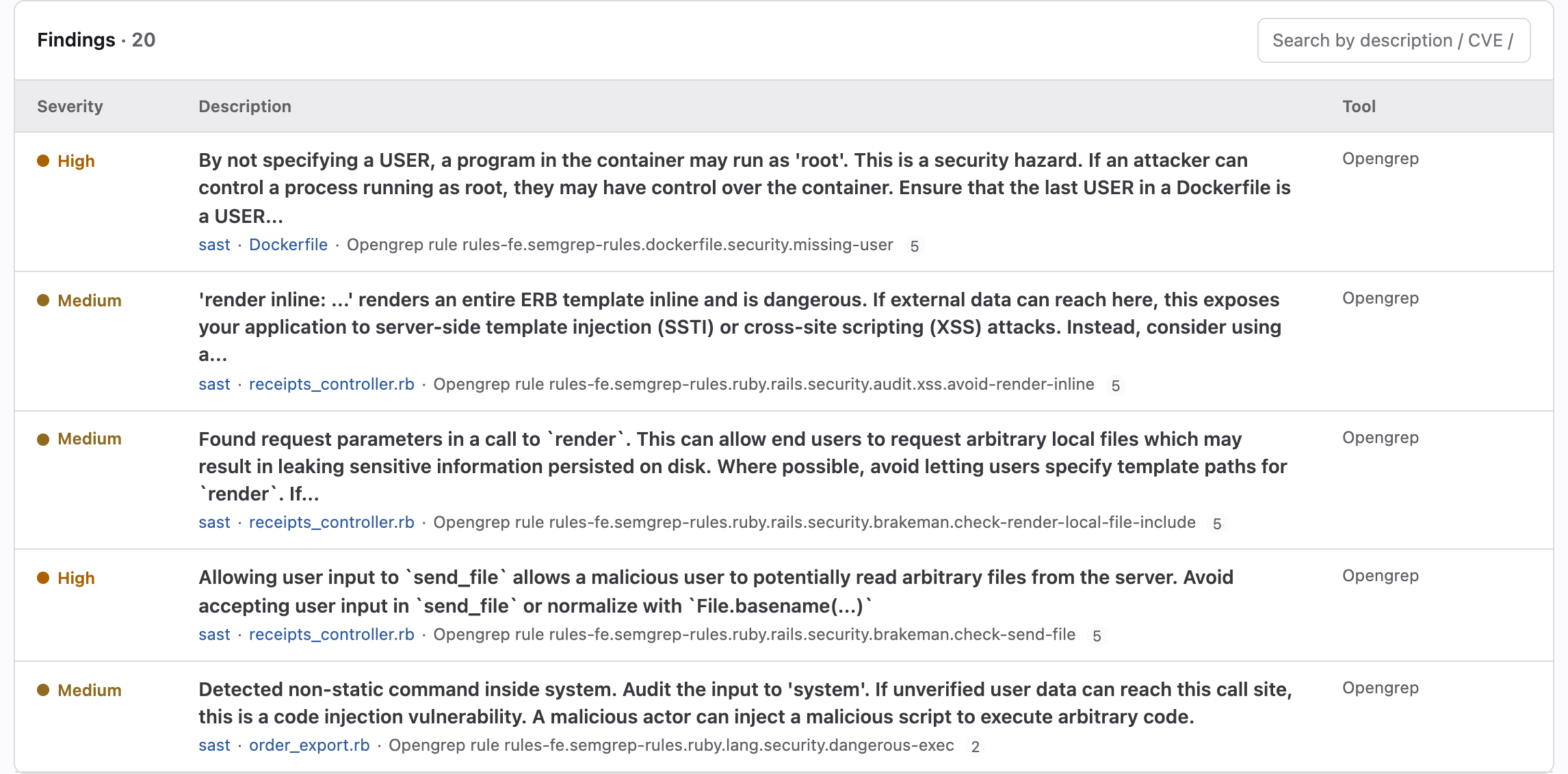
Security report (sast) | “Vulnerability report” page; the “Security configuration” page lists SAST as configured once the report has been uploaded |
| Findings forwarded to DefectDojo | DefectDojo, when the DefectDojo integration is configured |
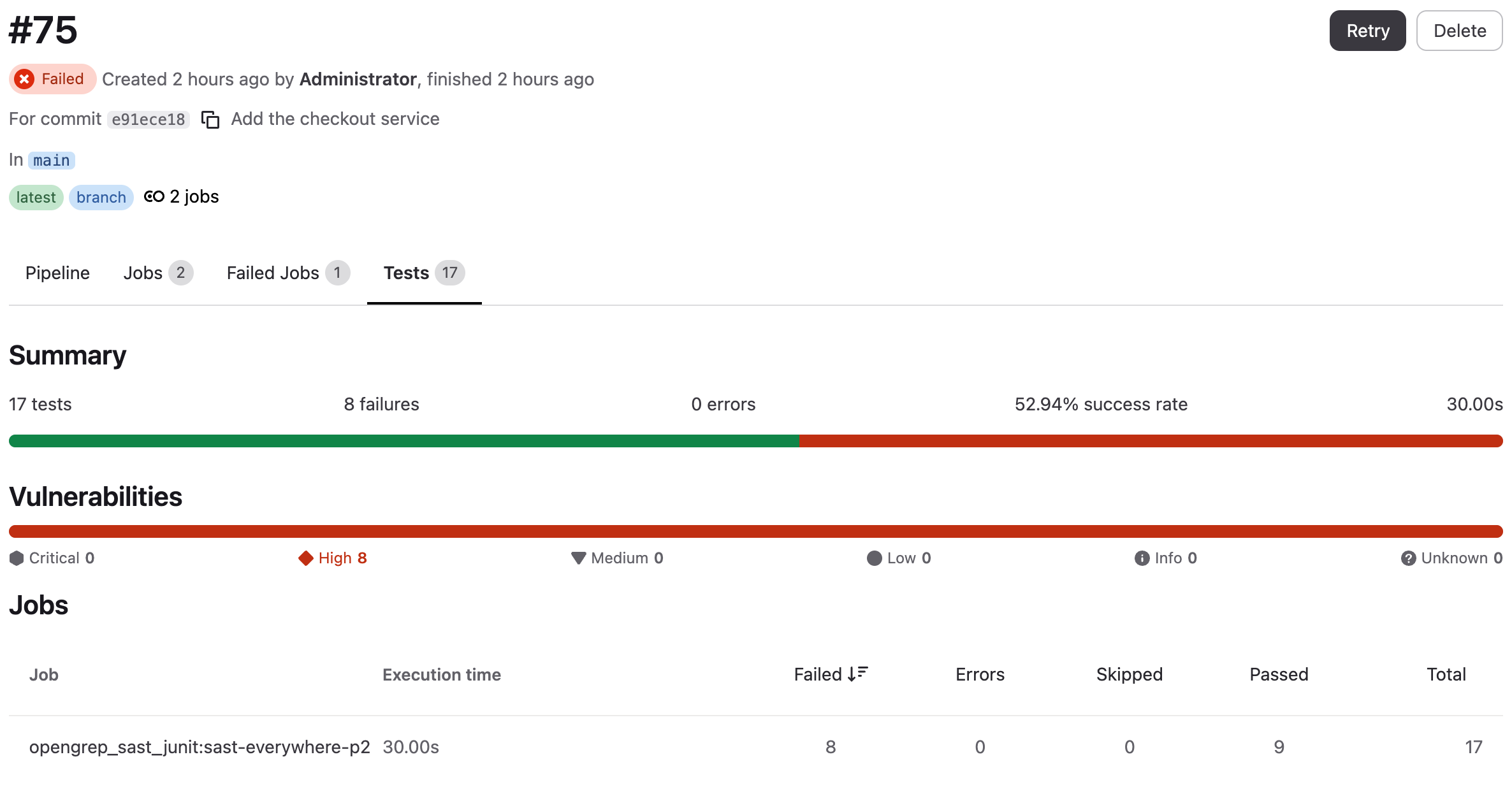
Each test case is named after its finding: a severity token, the rule’s identifier (its primary id, or check_id if it has none), the first line of its short description or message, cut at 255 characters, and the file and line in brackets. A repeated name gets a trailing counter.
![The job’s test cases in the “Tests” tab, each named after its finding, for example HIGH rules-fe.semgrep-rules.dockerfile.security.missing-user By not specifying a USER, … [Dockerfile:5], with file, status, severity “High” and a details button](/products/code/images/opengrep_pipeline_test_cases_en.png)
The merge request widget “Security scans summary” compares the test report of the merge request’s pipeline with the one from the target branch’s pipeline. Findings the merge request introduces appear under “New”, followed by those that already exist on the target branch; tests it fixes appear under “Fixed”.
![The merge request widget “Security scans summary” expanded, with 10 failed of 20 tests total; below it the job opengrep_sast_junit:sast-everywhere-p2 and, under “New”, the first failure the merge request introduces, HIGH rules-fe.semgrep-rules.ruby.lang.security.bad-deserialization-yaml … [app/services/order_export.rb:11]](/products/code/images/opengrep_mr_test_summary_en.png)
Prerequisites
Before the scan can run, make sure that:
- a security policy project is linked to the project or to a group above it;
- a GitLab Runner with a
dockerexecutor is available, and it can pull both images the scan uses: the scanner image (see “Where the scanner image comes from” below) and the Ruby image the second job runs on,ruby:3.3.10-slimby default, which an installation redirects with the server environment variableFE_SCANS_REPORT_CONVERTER_IMAGE.
Turning the scan on
Add an opengrep_sast action to .deckhouse_code/security-policies/policy.yml in the security policy project:
scan_execution_policy:
  - name: SAST everywhere
    enabled: true
    rules:
      - type: pipeline
        branches: ["*"]
    actions:
      - scan: opengrep_sast
opengrep_sast is the identifier the policy schema accepts for this scan. A policy whose action says semgrep_sast or sast fails validation and mandates nothing until the action is renamed.
Then link the policy project to the target project or group in “Settings” → “Security policy”. Every pipeline the rules match then gains the two jobs above.
The same policy can be created in the interface. In the project or group, select “Secure” → “Policies” and click “New policy”:

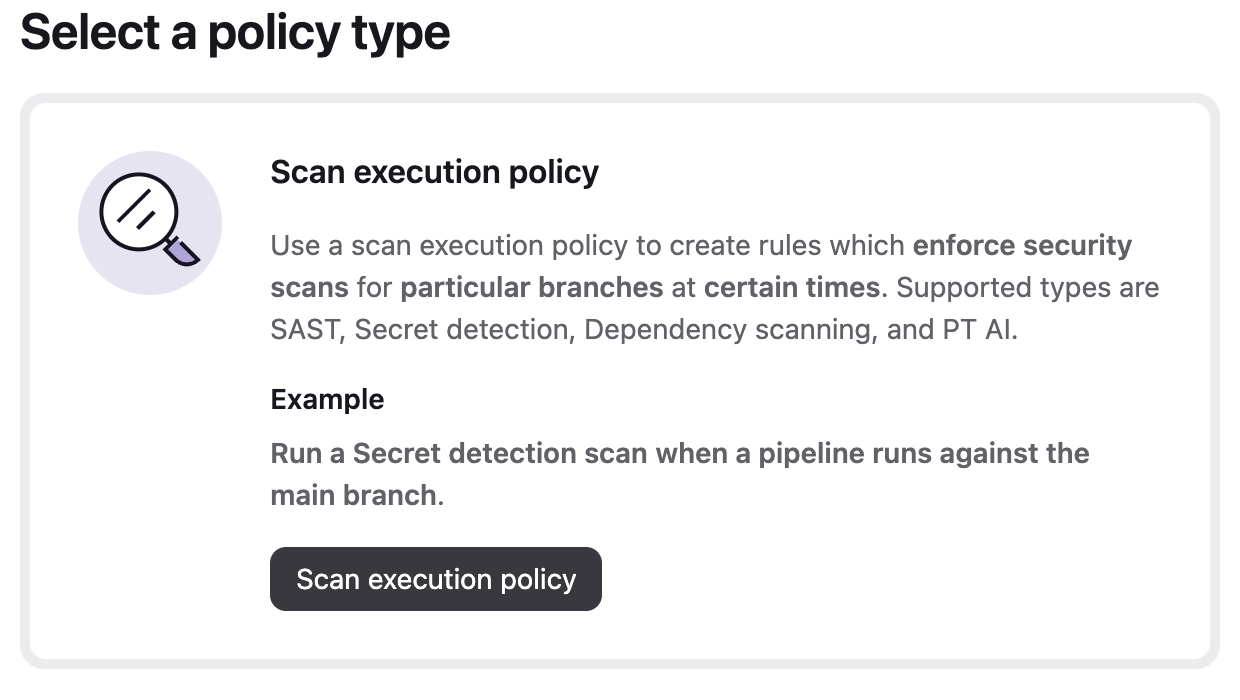
On “Select a policy type”, click “Scan execution policy”:
In the policy editor the scan is “SAST (embedded Opengrep)” in the “Security scans” list, and it is mandated while at least one of its groups, described below, is switched on. The run triggers are the checkboxes under “When to run scans”: “Any pipeline”, “Merge requests”, “Default branch”, “Scheduled scan” with its “Cadence”, and “By branch name” with its “Branch pattern”. They combine; “Any pipeline” clears “Merge requests”, “Default branch” and “By branch name” and keeps them unavailable while it is on. A policy with no trigger cannot be saved, and the schema rejects one pushed by hand.
What the policy sets
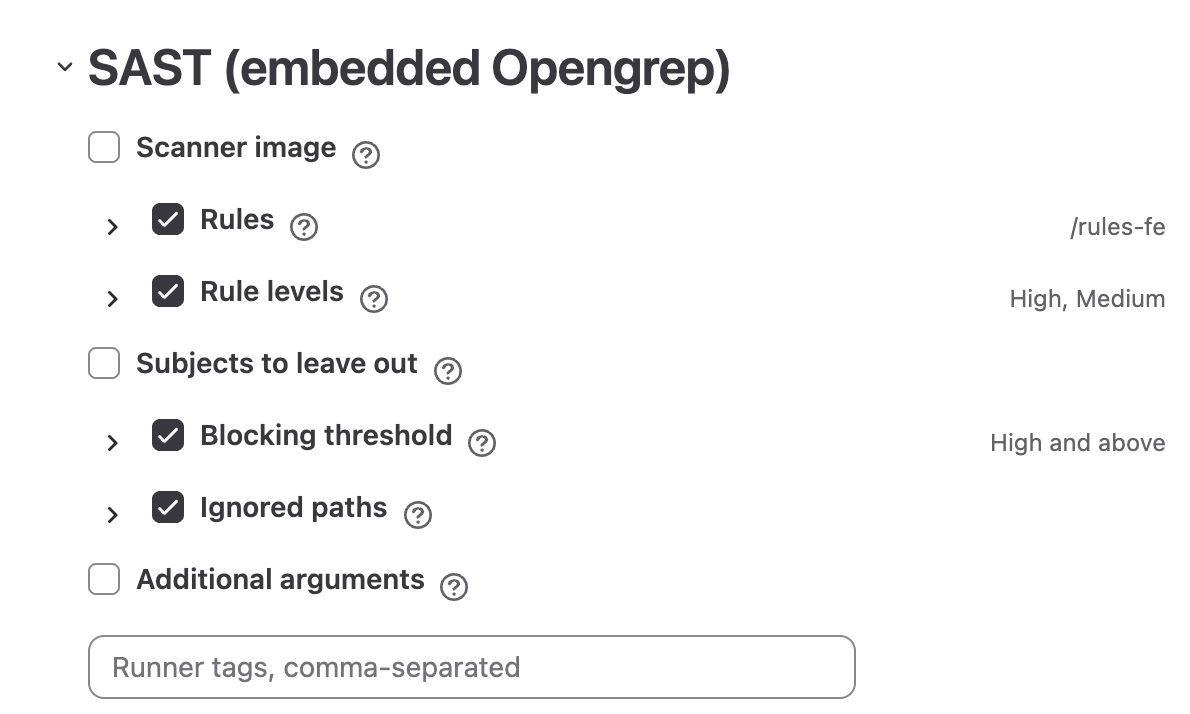
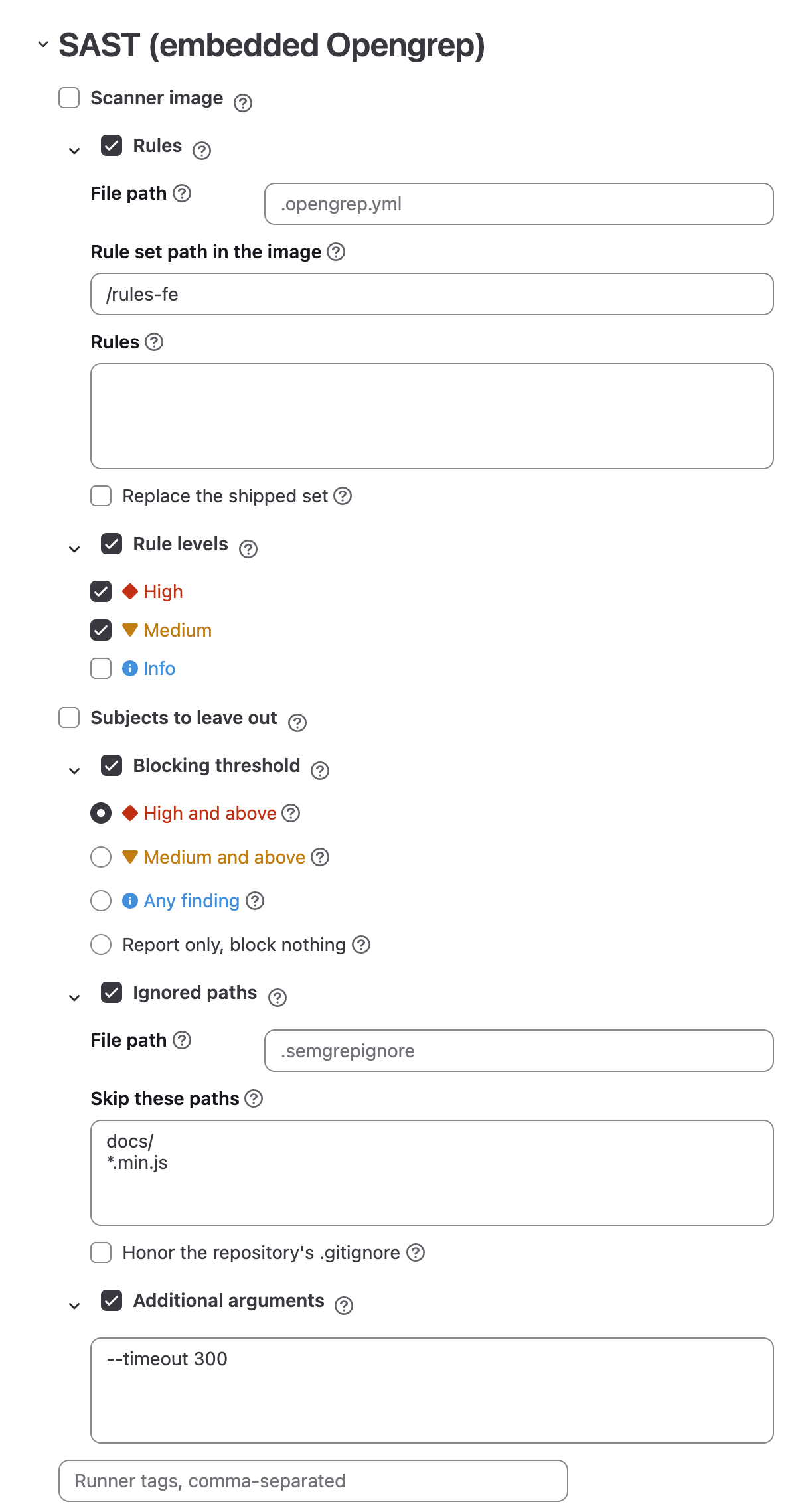
The form for the opengrep_sast action is built from the groups “Scanner image”, “Rules”, “Rule levels”, “Subjects to leave out”, “Blocking threshold”, “Ignored paths” and “Additional arguments”. Every option belongs to the policy: the server writes the values into the job while the pipeline is rendered, so the scanned project’s own CI/CD variables cannot change them.
Each group carries a checkbox beside its title. Ticked, the group opens and the policy takes that part of the scan over for every project it covers: “Rules” starts with /rules-fe as the rule set path, “Rule levels” with all three levels, “Blocking threshold” with “High and above”, and the other groups write nothing until a field in them is filled. Unticked, a group writes nothing into the policy, and that part of the scan keeps the answer the job gives without it, which is the same answer. Unticking every group removes the opengrep_sast action from the policy. Save the policy and open it again, and the groups it holds something in come back open, so a saved policy always shows everything it sets.
A group is named after the field it is built around, and that field is drawn without its own label inside the group: “Rule levels” opens on the three level boxes, “Blocking threshold” on the threshold, “Additional arguments” on its text field, and “Scanner image” keeps its field on the title line. The hint ("?") beside a group’s title carries the hint of that field or the group’s own description.
What a closed group has settled is stated at the end of its title line:
| Group | What its closed line states |
|---|---|
| “Scanner image” | Nothing: the field itself stays on the title line, and the reference is read there |
| “Rules” | The rule file path and the project it is read from, or the rule set path in the image |
| “Rule levels” | The levels the policy switched on, such as “High, Medium” |
| “Subjects to leave out” | Nothing. The group holds checkboxes |
| “Blocking threshold” | The threshold — “High and above” until the policy picks another |
| “Ignored paths” | The filter file path and the project it is read from |
| “Additional arguments” | Nothing. Free text carries no choice out of a list |
A field that answers to one choice is drawn only once that choice is made, and a value the form hides is removed from the policy: naming a rule file takes “Rule set path in the image”, “Rules” and the boxes of “Subjects to leave out” off the form and out of the policy.
A policy written by hand may also set FE_SCANS_OPENGREP_SRC_DIRECTORY in the action’s variables to a directory inside the checkout: the scan then reads that directory alone and reports findings with paths relative to the checkout, and a directory the repository does not have stops the job.
Scanner image
The group is its one field, “Scanner image”, on the title line. Left empty, the scan runs the image this installation is set to, which the field shows greyed out and its hint names: “Left empty, the scan runs <image>.” The hint also states what the shipped image holds: “Opengrep 1.30.0 ships with this product, in image 1.30.0-fe2, with rule set 2.9.3-fe2.”
| Field | What it sets |
|---|---|
| “Scanner image” | The image the scan runs in, as a whole reference: a path of two or more segments and a tag or an @sha256: digest, such as registry.example.com/security/opengrep-scan:1.30.0-fe2. A first segment without a dot or a port is read as a Docker Hub path. The rule set is the image’s own, so an image that carries none needs rules named in the policy. Left empty, the image this installation is set to. |
The field offers nothing to pick from: an installation that mirrors the scanner or builds its own image names a reference the product could not list.
A reference that is not whole does not stop the policy from being saved. The job then starts on the image the installation is set to and stops before scanning with this scan cannot run the configuration the policy asks for: scanner image: …. A tag such as latest passes the check, and the scanner then moves whenever the registry moves the tag.
Which image an empty field means, and where an administrator sets it, is in “Where the scanner image comes from”.
Rules
This group sets which rules the scan runs. Its hint: “Which rules the scan runs. Left alone, the set that ships with this product. Name a file to run rules of your own beside it, or in place of it.”
| Field | What it sets |
|---|---|
| “File path” | Path to a rule file inside the repository it is read from, such as the .opengrep.yml the field shows greyed out. Left empty, the shipped set is the whole of the scan and no file is read. |
| “Project” | Which repository the rule file is read from, as group/project. Shown once “File path” is filled. Left empty, the project being scanned, at the commit being built. |
| “Rule set path in the image” | Which of the sets carried inside the scanner image to run (see “Rule sets in the image”). Default: /rules-fe. Shown while no file is named. The scan stops if the image has no set at this path. |
| “Rules” | The rules themselves, in the scanner’s own YAML, written into the job by the server. Shown while no file is named. At most 16 KB. |
| “Replace the shipped set” | Off by default: your own rules run alongside the shipped set. Ticked, they run instead of it, and everything the shipped set covered stops being checked. |
The rule sources differ in who owns the file:
| Source | Where the rules live | Who controls them |
|---|---|---|
| “File path” empty | Inside the scanner image, at “Rule set path in the image” | The product release |
| “File path” filled, “Project” empty | The repository being scanned, at the commit being built | The scanned project |
| “File path” filled, “Project” named | That project, on its default branch | The maintainers of that project |
| “Rules” | The policy itself | The policy author |
A file in the scanned project is read from the job’s own checkout. A file in another project is read by the job itself, over the API, with its CI job token, so that project decides whose jobs may read it: a maintainer of it adds the scanned project under “Settings” → “CI/CD” → “Job token permissions”. The job stops, naming that setting, when the project answers 401, 403 or 404, and when the file is missing or empty. A named project is always read at its default branch, whatever ref the scanned pipeline runs on.
Rules the policy supplies, from a file or from “Rules”, are written inside the job to /rules/policy/rules.yml, so their findings are named rules.policy.<rule id> in the reports; findings of the shipped set are named after the rule set path, rules-fe.<rule id> at the default path. Before the scan the job checks the supplied set: a set the scanner cannot parse, a set that holds no rules, and a set whose rules need a newer engine than the image carries each stop the job and print the scanner’s output. Leaving “Replace the shipped set” unticked keeps the shipped set running beside them.
Rule levels
This group sets which levels of rule run at all.
| Field | What it sets |
|---|---|
| “Rule levels” | “High” (ERROR), “Medium” (WARNING), “Info” (INFO). All three boxes come up ticked, which is what a scan runs while the policy has set no levels of its own. |
A level is exactly the rules the scanner marks with it: “High” the ERROR rules, “Medium” the WARNING rules, “Info” the INFO rules — and a finding is reported at the level of the rule that found it. Unticking a level takes exactly that level’s rules out of the run.
The last level left ticked cannot be unticked. An emptied list is removed from the policy, and a policy that names no levels is the state that runs every level.
“Rule levels” and “Blocking threshold” look alike and do different things:
| Field | Effect | A finding below the level |
|---|---|---|
| “Rule levels” | Which rules are evaluated | Does not exist: the rule never ran |
| “Blocking threshold” | Which findings fail the pipeline | Is in the report, but does not block |
A threshold covers its own level and every level above it, which is what “and above” says; a rule level covers the rules the scanner marks with that level and no others.
Leaving a level out therefore removes its findings from the report as well as from blocking: the vulnerability report and DefectDojo both get smaller, and the job log says nothing about it. A threshold that no ticked level can reach never fires; the form says so beside the threshold: “No rule level that can reach this threshold is switched on, so nothing will ever fail the pipeline.” Levels that leave no rule of the set to run stop the scan job with no rule survived the levels this policy runs.
Subjects to leave out
This group sets which subjects of the shipped set the scan leaves out. It is drawn while the rules come from the shipped set: naming a rule file takes the group off the form, because rules of your own carry no subject to leave out.
| Field | What it sets |
|---|---|
| “Leave out the secret rules” | Off by default. Ticked, the rules that report credentials committed to the repository stay out of the run. |
| “Leave out the configuration rules” | Off by default. Ticked, the rules that read configuration and infrastructure code — Terraform, Dockerfiles, Kubernetes manifests, CI configuration — stay out of the run. |
| “Leave out the malicious code rules” | Off by default. Ticked, the rules that look for the marks of deliberately hidden code stay out of the run. |
A ticked box leaves the subject out; an empty one runs it, which is what a policy written before these fields existed goes on doing. The group’s hint states what the choice is for: where another mandated scan already covers one of these subjects, both report it, and the same line is a finding twice.
What each subject holds, and the rule set an exclusion needs, are in “Subjects inside the shipped set”.
Blocking threshold
This group sets what a finding does to the pipeline.
| Field | What it sets |
|---|---|
| “Blocking threshold” | What fails the pipeline. Findings below the threshold are still reported and still reach the vulnerability report; the threshold decides the pipeline’s outcome and nothing else. Default: “High and above”. |
Threshold values, each with the hint the form shows beside it:
| Value | What fails the pipeline |
|---|---|
| “High and above” (default) | A high finding fails the pipeline. Medium and info are reported. |
| “Medium and above” | Medium and high fail the pipeline. Info is reported. |
| “Any finding” | Any finding fails the pipeline, whatever its level. |
| “Report only, block nothing” | Nothing fails the pipeline. Findings are still reported and still reach the vulnerability report. |
Opengrep reports at ERROR, WARNING and INFO, which the scan shows as high, medium and info. It has no critical and no low, so a threshold named after either would be one no finding could reach. “Report only, block nothing” puts the decision to block nothing into the policy as a value of its own. A threshold outside this list, possible only in a policy written by hand, stops the job before the scan.
Ignored paths
This group sets what the scan leaves out. Its hint: “What the scan leaves out. The job keeps its own exclusions for vendored and generated code whatever is set here.”
| Field | What it sets |
|---|---|
| “File path” | Path to a file of ignored paths inside the repository it is read from, in the .semgrepignore format the scanner reads; the field shows .semgrepignore greyed out. Left empty, no file is read. |
| “Project” | Which repository that file is read from, as group/project. Shown once “File path” is filled. Left empty, the project being scanned, at the commit being built; a named project is read the way a rule file is, with the job token. |
| “Skip these paths” | One path or pattern per line: third-party code, fixtures, generated files. Passed to the scanner whichever file is used. |
| “Honor the repository’s .gitignore” | Off by default: a mandated scan looks at ignored files too, because the ignore list is the scanned project’s own. |
Before the scan the job sets aside every .semgrepignore the repository carries, at its root and in subdirectories. A file the policy names is read before that and written back as the one ignore file of the run, with the job’s own exclusions appended: node_modules/, vendor/, dist/, build/, .venv/ and .git/. An empty file stops the job.
“File path” with “Project” left empty and “Honor the repository’s .gitignore” both hand the scanned project the say over what the mandated scan examines: a commit in that project can then narrow the scan that checks it, and the narrowing stays invisible in the policy. A team that lets each project name its own third-party directories records that delegation in the policy, since both settings stay off until this group is opened and one of them is set.
A pattern that matches nothing passes the form’s validation. The job prints how many files the scanner took in hand, how many the filters removed and how many it read, and fails when the filters removed everything or the checkout holds nothing.
Additional arguments
This group sets the flags the rest of the form does not name.
| Field | What it sets |
|---|---|
| “Additional arguments” | Flags passed to the scan as written. |
“Additional arguments” tunes the resources of the run: timeouts, memory limits, maximum file size. The flags the job owns are refused: --config, -c, -f, --output, -o, --json, --json-output, --sarif, --sarif-output, --junit-xml, --junit-xml-output, --emacs, --emacs-output, --vim, --vim-output, --text, --text-output, --gitlab-sast, --gitlab-sast-output, --gitlab-secrets, --gitlab-secrets-output, --metrics and --baseline-commit. The server refuses them while the job is rendered, and the job stops before the scan, naming the flag.
The hint on this field also states where the scan’s findings end up: they are published as a security report, so they reach the vulnerability report and whatever the administrator has connected to it.
Rule sets in the image
By default the scan runs the rule set carried inside the scanner image, at /rules-fe. That directory holds the sets below, and “Rule set path in the image” chooses between them:
| Path in the image | Rules | What it holds |
|---|---|---|
/rules-fe (default) | 2825 | The sets below together |
/rules-fe/semgrep-rules | 1981 | The open semgrep-rules set |
/rules-fe/gitlab | 483 | The rules of the GitLab analyzers |
/rules-fe/community | 361 | Community rules |
These figures were measured in the shipped image opengrep-scan:1.30.0-fe2 and describe that image; a newer image may carry a different set. Each set is distributed under its own terms, and the directories are what tell them apart: point “Rule set path in the image” at one set to run it alone.
The set covers, by rules per language: python 618, terraform 366, javascript 352, java 341, typescript 235, go 195, c 194, scala 191, cpp 161, ruby 150, php 122, kotlin 105, and solidity, yaml, dockerfile, swift, csharp and others. A rule may name several languages, so the figures add up to more than the rule count. The scanner evaluates only the rules for the languages of the files it finds, so the job log of a JavaScript repository reports far fewer rules run than the set holds.
Rules of your own are added through “File path” or “Rules” and, with “Replace the shipped set” left unticked, run alongside whichever set the image provides.
Subjects inside the shipped set
The rules in the set are marked by subject: what a rule judges.
| Subject | What its rules judge |
|---|---|
| Code | The program’s own code |
| Configuration | Configuration and infrastructure code: Terraform, Dockerfiles, Kubernetes manifests, CI configuration |
| Secrets | Credentials committed to the repository |
| Malicious code | The marks of deliberately hidden code: obfuscation, code assembled at run time, execution routed through indirection |
Configuration, secrets and malicious code are the subjects the policy can leave out, in the “Subjects to leave out” group; the code rules run in every scan.
An exclusion needs a rule set that carries an index of its subjects, the CLASSES.tsv file beside the set at “Rule set path in the image”. The image shipped with this release carries no such index, so a ticked box stops the job on it, naming the subjects it was asked to leave out and the rule set that has no index to leave them out by — see “Troubleshooting”. The boxes apply to an image of your own whose set carries the index.
The secret rules and the gitleaks_secret_detection scan cover the same ground, and each scan publishes its own security report, so the same line arrives as two findings at two severities: measured on one run, Opengrep filed a token committed to the repository at Info and gitleaks_secret_detection filed the same token at Critical. Neither set of findings sits inside the other, so leaving the secret rules out moves the subject to gitleaks_secret_detection and takes the findings only Opengrep made off the SAST report with it.
The same reading applies to the configuration rules where a dedicated infrastructure scanner already covers that ground, and to the malicious code rules, which judge intent: a repository that obfuscates or assembles code at run time for reasons of its own sees them fire.
Where the scanner image comes from
The image the scan runs in is resolved by the server once, before the job starts, and written into the job as a literal value. It never becomes a CI/CD variable, so the scanned project’s own settings cannot point the scan at a different scanner. The scan job prints the reference it ran as Analyzer image … at the start of its log, and the engine the image carries beside it.
Which image that is follows from the “Scanner image” field of the policy:
| “Scanner image” in the policy | What the scan pulls |
|---|---|
| Filled in | That reference, exactly as written. |
| Empty | The image this installation is set to: the value of the environment variable FE_SCANS_OPENGREP_IMAGE of the Deckhouse Code server, or the image this release pins where the variable is unset. |
FE_SCANS_OPENGREP_IMAGE is an environment variable of the server processes that render pipelines, the web server and Sidekiq; an administrator sets it in their environment, and it is read at the moment a job is rendered. The same name among the CI/CD variables of a project or a group has no effect: the job never reads the image from a variable. In the policy file the field is the FE_SCANS_OPENGREP_IMAGE key of the action’s variables, which is what the editor writes:
actions:
  - scan: opengrep_sast
    variables:
      FE_SCANS_OPENGREP_IMAGE: registry.example.com/security/opengrep-scan:1.30.0-fe2
Every option of this scan, the image included, belongs to the policy, so Opengrep has no settings page among the scanner integrations; the integrations of the other mandated scanners are described in Security scanner integrations.
The version shipped with this product
This release ships opengrep-scan:1.30.0-fe2: Opengrep 1.30.0 with rule set 2.9.3-fe2. The tag numbers the image, and the engine and the rule set inside it move on their own: an image rebuilt with a newer rule set takes a new tag while the engine stands still. The hint beside “Scanner image” states all three numbers for the shipped image, and the scan job’s log prints the engine version and the rule set version it ran.
The “Scanner image” field takes either form of pin:
- a tag, such as
1.30.0-fe2, which a person can read and compare; - a digest, such as
@sha256:aafbcaff…, which names one build and cannot be moved to another.
A reference with neither is refused. The registry is part of the reference, so a mirrored image is named with its own registry.
The version shipped with a release is reviewed when Deckhouse Code is updated, so it moves forward with the product.
Installations with no route to the internet
An installation with no route to the internet provides both images the scan uses:
| Image | Default | How to redirect it |
|---|---|---|
| Scanner | opengrep-scan:1.30.0-fe2, from the product registry | The server environment variable FE_SCANS_OPENGREP_IMAGE, which redirects every policy whose “Scanner image” is empty; or the “Scanner image” field of a policy |
| Report converter | ruby:3.3.10-slim, from Docker Hub | The server environment variable FE_SCANS_REPORT_CONVERTER_IMAGE |
Copy both images into your own registry, then point the corresponding setting at that registry. When the image the installation is set to lives in the container registry of this Deckhouse Code instance, the policy editor asks that registry for the tag and, where the tag is missing, adds to the hint beside “Scanner image”: “The registry has no such tag: a scan that takes this image will fail to start until it is there.” A registry elsewhere is not asked.
The GitLab dependency proxy leaves the scanner image outside its reach. The proxy is a pull-through cache for images stored on Docker Hub, and the scanner image is published in the product registry; of the two images, it can cache the Ruby converter. An installation that wants to stop pulling the scanner image from outside on every run — with or without a route to the internet — copies it into its own registry and names that copy in FE_SCANS_OPENGREP_IMAGE or in “Scanner image”.
Compatibility with Semgrep
The job looks for the opengrep binary in the image and, when there is none, for semgrep, which reads the same command line; an image with neither stops the job with no opengrep in this image. With Semgrep the scan runs with --metrics=off, so it sends nothing to the vendor; Opengrep has no telemetry to switch off. Whichever engine runs, the scan is started with --disable-version-check, and before the engine is even located the job clears every OPENGREP_*, SEMGREP_* and PYTHON* variable it inherited and resets PATH, so the scanned project’s CI/CD settings cannot replace the rule set, the comparison base or the binary of the scan that checks it.
The ignore file keeps the name .semgrepignore, and the open rule set inside the image keeps its directory name /rules-fe/semgrep-rules.
Troubleshooting
The scan does not appear in the pipeline
Check that:
- the security policy project is linked to the project, and
.deckhouse_code/security-policies/policy.ymlin it contains a- scan: opengrep_sastaction: a policy withsemgrep_sastorsastfails validation and is skipped whole, and a file at the former path.gitlab/security-policies/policy.ymlis not read; - the policy’s rules match the pipeline (branch, pipeline source);
- a GitLab Runner with a
dockerexecutor is available.
The job fails with “this scan cannot run the configuration the policy asks for”
The server refused an option while rendering the job, and the scan job stops before scanning, printing the reason: a “Scanner image” that is not a whole reference, a refused flag in “Additional arguments”, a rule level or a blocking threshold the scanner does not have, rules written in the policy over 16 KB, a “Project” not written as group/project, or a “Project” named while “File path” is empty. Correct the option in the policy.
The job fails with “does not let this project’s jobs read it” or “is not on the default branch of”
A rule file or a filter file is named with a “Project”, and either the job token permissions of that project (“Settings” → “CI/CD” → “Job token permissions” in that project) do not list the scanned project, or the file is absent from that project’s default branch. A project the job may not read answers the same way as a missing file, so check the permissions in both cases.
The job fails with “no rule set at … in this image”
The path in “Rule set path in the image” does not exist in the image the scan resolved. Check the path against the table above, and check which image is actually in use: the scan job’s log names it as Analyzer image.
The job fails with “carries no class index to switch them off by”
A box in “Subjects to leave out” is ticked, and the rule set the scan resolved carries no CLASSES.tsv index of its subjects. Untick the boxes, or point the scan at a rule set that carries the index. The job prints the subjects it was asked to leave out and the rule set it read.
The neighbouring message, that the index holds no rule in any of the named subjects, is answered the same way.
The job fails with “the rule set this policy supplies …”
The set named in “File path” or written in “Rules” failed the check the job runs before the scan: is not valid configuration for this scanner names a rule the scanner cannot parse, holds no rules an empty set, and asks for a newer scanner than this image has a rule marked incompatible with the engine in the image. The scanner’s own output follows the message.
The job fails with “opengrep read no files at all”
The scan examined nothing, so it refuses to report success. The usual causes are filters that removed the whole repository or a checkout with nothing in it. The job’s log prints how many files it took in hand and how many the filters removed.
The scan succeeds but finds nothing
Most often the rule set covers none of the repository’s languages: the scan job then prints Opengrep: … file(s) here, and the rule set covers none of their languages. and publishes no report. Check the job log: it prints the rule set path in use and the number of rules loaded and run. Narrowing “Rule levels” or “Rule set path in the image” has the same effect for a different reason: a level or a set the policy left out never runs, so its findings are absent from the report entirely.