Available in: Open/CE, Core, BE, SE, SE+, Ultimate/EE
The module lifecycle stage: Generally available version
The module has requirements for installation
The module starts reading logs only if log-pipeline is created. Log-pipeline consists of ClusterLoggingConfig/PodLoggingConfig connected to ClusterLogDestination.
How to explicitly enable or disable the module…
You may explicitly enable or disable the module in one of the following ways:
-
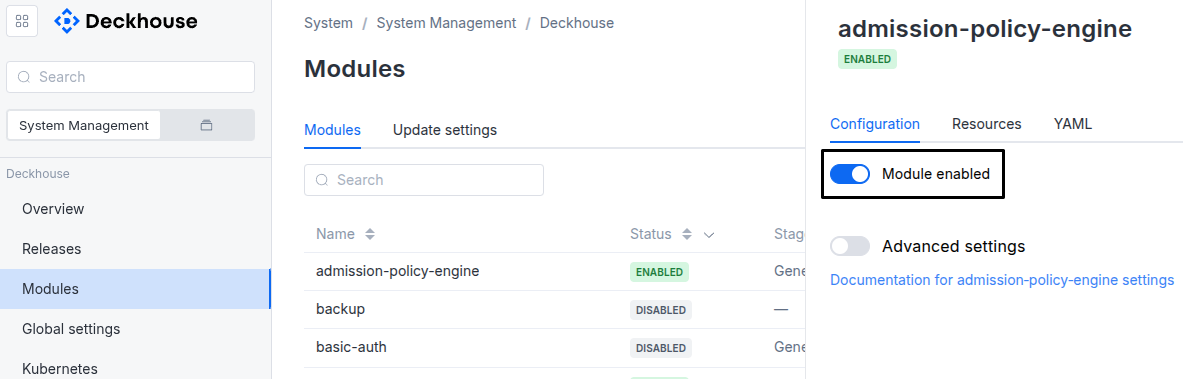
Via Deckhouse web UI. In the “System” → “System Management” → “Deckhouse” → “Modules” section, open the
log-shippermodule and enable (or disable) the “Module enabled” toggle. Save changes.Example:
-
Via Deckhouse CLI (d8).
Use the d8 system module enable command for enabling, or d8 system module disable command for disabling the module (you need Deckhouse CLI (d8), configured to work with the cluster).
Example of enabling the module:
d8 system module enable log-shipper -
Using ModuleConfig
log-shipper.Set
spec.enabledtotrueorfalsein ModuleConfiglog-shipper(create it if necessary).Example of a manifest to enable module
log-shipper:apiVersion: deckhouse.io/v1alpha1 kind: ModuleConfig metadata: name: log-shipper spec: enabled: true
You can configure the module in one of the following ways:
-
Via Deckhouse web UI.
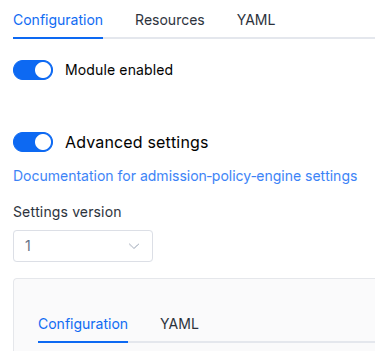
In the “System” → “System Management” → “Deckhouse” → “Modules” section, open the
log-shippermodule and enable the “Advanced Settings” toggle. Fill in the required fields in the “Configuration” tab or specify the module settings in YAML format on the “YAML” tab, without the top-levelsettingskey. Save the changes.Example:
You can also edit the ModuleConfig object
log-shipperon the “YAML” tab in the module settings window (“System” → “System Management” → “Deckhouse” → “Modules”, open the modulelog-shipper) by specifying the schema version in thespec.versionparameter and the necessary module parameters in thespec.settingssection. -
Via Deckhouse CLI (d8) (requires Deckhouse CLI (d8) configured to work with the cluster).
Edit the existing ModuleConfig
log-shipper(for more details on configuring Deckhouse Platform, see the documentation) by executing the following command:d8 k edit mc log-shipperMake the necessary changes in the
spec.settingssection. If necessary, specify the schema version in thespec.versionparameter. Save the changes.You can also create a manifest file for ModuleConfig
log-shipperusing the example below. Fill in thespec.settingssection with the required module parameters. If necessary, specify the schema version in thespec.versionparameter.Apply the manifest using the following command (indicate the manifest file name):
d8 k apply -f <FILENAME>Example of a manifest for ModuleConfig
log-shipper:apiVersion: deckhouse.io/v1alpha1 kind: ModuleConfig metadata: name: log-shipper spec: version: 2 enabled: true settings: # Module parameters from the "Parameters" section below.
Requirements
To the Deckhouse Platform version: 1.76.0 and above.
Conversions
The module is configured using the ModuleConfig resource, the schema of which contains a version number. When you apply an old version of the ModuleConfig schema in a cluster, automatic transformations are performed. To manually update the ModuleConfig schema version, the following steps must be completed sequentially for each version:
-
Updates from version 1 to 2:
Move
.settings.resourcesRequests.static.cpuand.settings.resourcesRequests.static.memoryto.settings.resourcesRequests.static.requests.
Parameters
Schema version: 2
-
-
booleansettings.debugEnables or disables agent debug logging.
Default:
false -
objectsettings.nodeSelector
The same as in the Pods’
spec.nodeSelectorparameter in Kubernetes.If the parameter is omitted or
false,nodeSelectorwill be determined automatically. -
objectsettings.resourcesRequests
Max amounts of CPU and memory resources that the pod can request when selecting a node.
If the
vertical-pod-autoscalermodule is disabled, then these values become the default ones.Default:
{}Examples:
mode: VPA vpa: cpu: max: 2 min: 50m memory: max: 2Gi min: 256Mi mode: Automode: VPA vpa: cpu: max: 3000m min: 1 memory: max: 4096 min: 1024 mode: Initialmode: Static static: limits: cpu: 2 memory: 2Gi requests: cpu: 55m memory: 256Mi-
stringsettings.resourcesRequests.mode
Required value
Resource request management mode:
Default:
VPAAllowed values:
VPA,Static -
objectsettings.resourcesRequests.staticResource request management options for the
Staticmode.Default:
{}-
objectsettings.resourcesRequests.static.limitsConfiguring CPU and memory limits.
-
settings.resourcesRequests.static.limits.cpuConfiguring CPU limits.
-
settings.resourcesRequests.static.limits.memoryConfiguring memory limits.
-
-
objectsettings.resourcesRequests.static.requestsResource requests settings for pods.
-
settings.resourcesRequests.static.requests.cpuConfiguring CPU requests.
-
settings.resourcesRequests.static.requests.memoryConfiguring memory requests.
-
-
-
objectsettings.resourcesRequests.vpaResource request management options for the VPA mode.
Default:
{}-
objectsettings.resourcesRequests.vpa.cpu
Required value
CPU-related parameters.Default:
{}-
settings.resourcesRequests.vpa.cpu.maxThe maximum value that the VPA can set for the CPU requests.
Default:
500m -
settings.resourcesRequests.vpa.cpu.minThe minimum value that the VPA can set for the CPU requests.
Default:
50m
-
-
objectsettings.resourcesRequests.vpa.memory
Required value
The amount of memory requested.Default:
{}-
settings.resourcesRequests.vpa.memory.maxThe maximum memory requests the VPA can set.
Default:
2048Mi -
settings.resourcesRequests.vpa.memory.minThe minimum memory requests the VPA can set.
Default:
64Mi
-
-
stringsettings.resourcesRequests.vpa.mode
Required value
The VPA usage mode.Default:
InitialAllowed values:
Initial,Auto
-
-
-
array of objectssettings.tolerations
The same as in the Pods’
spec.tolerationsparameter in Kubernetes;If the parameter is omitted or
false,tolerationswill be determined automatically.-
stringsettings.tolerations.effect
-
stringsettings.tolerations.key
-
stringsettings.tolerations.operator
-
integersettings.tolerations.tolerationSeconds
-
stringsettings.tolerations.value
-
-