DVP can collect statistics about the availability of cluster components and Deckhouse components themselves. This data allows you to evaluate the degree of SLA compliance and obtain availability information in the web interface.
In addition, using the custom resource UpmeterRemoteWrite, you can export availability metrics via the Prometheus Remote Write protocol.
To start collecting availability metrics and activate the interface, enable the upmeter module in the Deckhouse web interface or use the following command:
d8 system module enable upmeter
Module Configuration
The upmeter module is configured using the upmeter ModuleConfig:
apiVersion: deckhouse.io/v1alpha1
kind: ModuleConfig
metadata:
  name: upmeter
spec:
  version: 3
  enabled: true
  settings:
The complete list of settings is available in the module documentation.
Interface
DVP provides two web interfaces for availability assessment:
-
Status page.
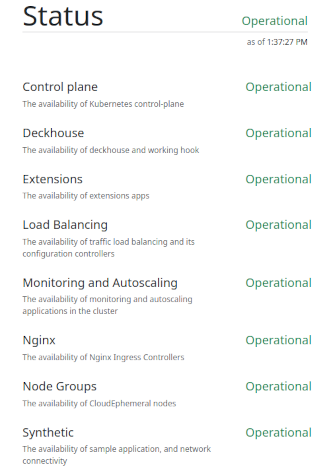
You can get the page address in the web interface on the main page in the “Tools” section (the “Status page” block), or by running the command:
d8 k -n d8-upmeter get ing status -o jsonpath='{.spec.rules[*].host}'Example of the status page web interface:
-
Component availability page.
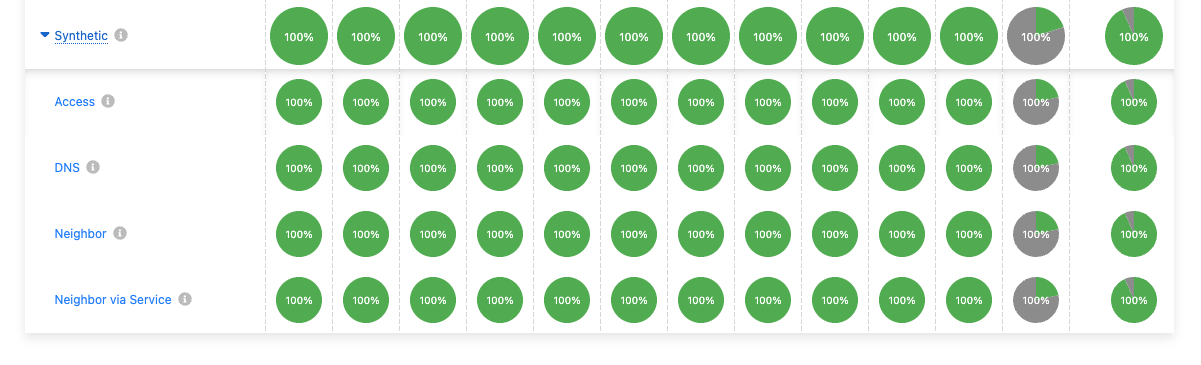
You can get the page address in the web interface on the main page in the “Tools” section (the “Component availability” block), or by running the command:
d8 k -n d8-upmeter get ing webui -o jsonpath='{.spec.rules[*].host}'Example of the component availability page:
Status Metrics Export
Example configuration of UpmeterRemoteWrite for exporting status metrics via the Prometheus Remote Write protocol:
apiVersion: deckhouse.io/v1
kind: UpmeterRemoteWrite
metadata:
  labels:
    heritage: upmeter
    module: upmeter
  name: victoriametrics
spec:
  additionalLabels:
    cluster: cluster-name
    some: fun
  config:
    url: https://upmeter-victoriametrics.whatever/api/v1/write
    basicAuth:
      password: "Cdp#Cd.OxfZsx4*89SZ"
      username: upmeter
  intervalSeconds: 300
Authentication
By default, the user-authn module is used for authentication. You can also configure authentication via externalAuthentication.
If these options are disabled, the module will enable basic authentication with a generated password.
You can view the generated password using the following command:
d8 k -n d8-system exec svc/deckhouse-leader -c deckhouse -- deckhouse-controller module values upmeter -o json | jq '.upmeter.internal.auth.webui.password'
To generate a new password, you need to delete the Secret:
d8 k -n d8-upmeter delete secret/basic-auth-webui
You can view the generated password for the status page using the following command:
d8 k -n d8-system exec svc/deckhouse-leader -c deckhouse -- deckhouse-controller module values upmeter -o json | jq '.upmeter.internal.auth.status.password'
To generate a new password for the status page, you need to delete the secret:
d8 k -n d8-upmeter delete secret/basic-auth-status
Attention! The
auth.status.passwordandauth.webui.passwordparameters are no longer supported.
Behavior of upmeter pods
Upmeter tests create temporary pods to check that Kubernetes components are working. As a result, some pods are periodically deleted, remain in the Pending state, or move between nodes.
The following objects take part in the checks:
upmeter-probe-scheduler: Checks the scheduler. The test creates a pod, schedules it to a node, and then deletes it.upmeter-probe-controller-manager: Checkskube-controller-manager. The test creates a StatefulSet and verifies that the StatefulSet created a pod. This test does not check pod placement on a node, so it creates a pod that cannot be scheduled and stays in thePendingstate. Then the StatefulSet is deleted, and the test verifies that the spawned pod is deleted as well.smoke-mini: Checks network connectivity between nodes. Five StatefulSets with one replica each are created. The test checks connectivity betweensmoke-minipods andupmeter-agentpods on master nodes. Once a minute, one of thesmoke-minipods is moved to another node.