This page describes the architecture of the node-manager module for CloudStatic nodes.
Module architecture
The following simplifications are made in the diagram:
- The diagram shows containers in different pods interacting directly with each other. In reality, they communicate via the corresponding Kubernetes Services (internal load balancers). Service names are omitted if they are obvious from the diagram context. Otherwise, the Service name is shown above the arrow.
- Pods may run multiple replicas. However, each pod is shown as a single replica in the diagram.
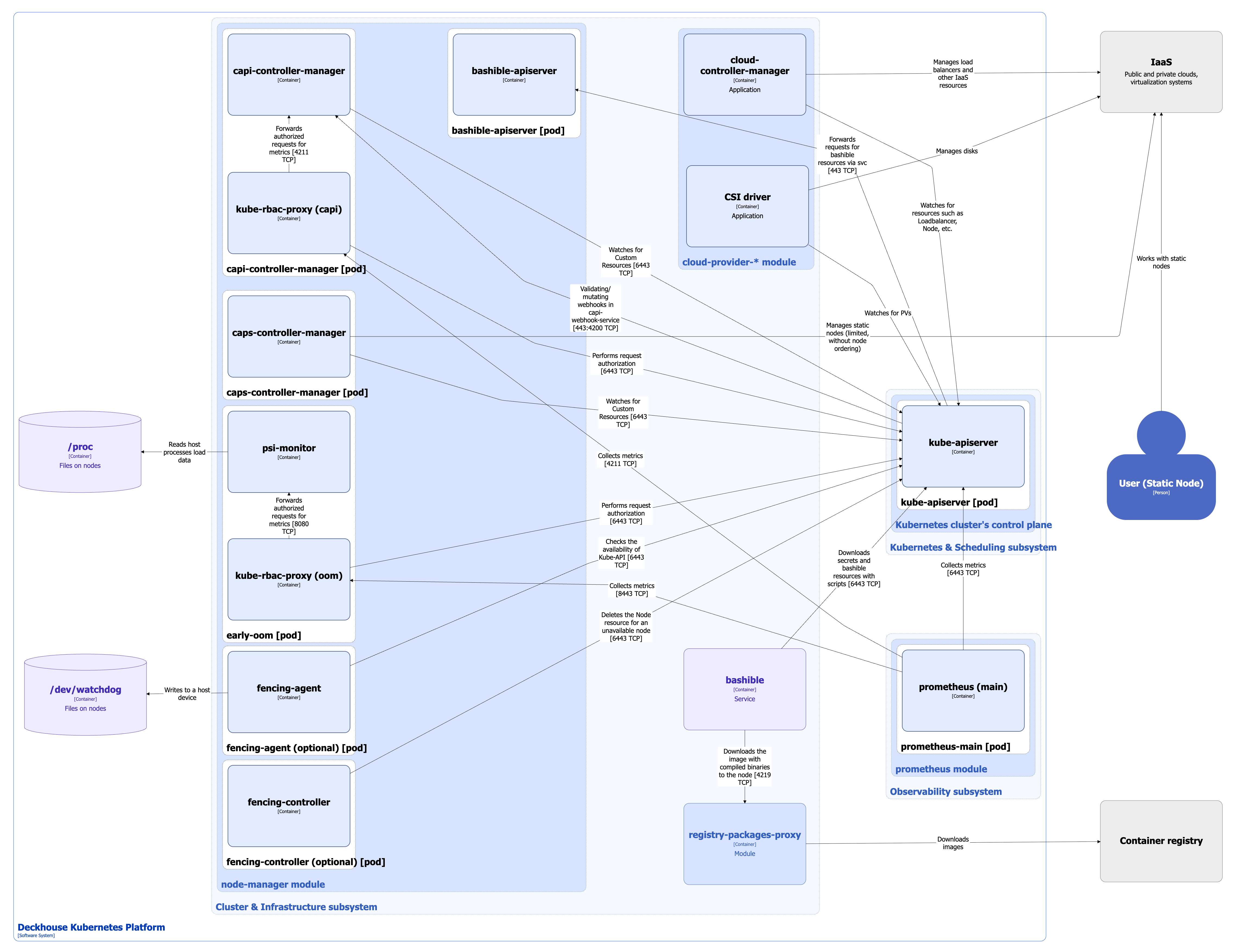
The Level 2 C4 architecture of the node-manager module and its interactions with other Deckhouse Kubernetes Platform (DKP) components are shown in the following diagram:
Module components
Bashible is a key component of the Cluster & Infrastructure subsystem that enables the operation of the node-manager module. However, it is not part of the module itself, as it runs at the OS level as a system service. For Bashible details, refer to the corresponding documentation section.
The module managing CloudStatic nodes consists of the following components:
-
Bashible-api-server: A Kubernetes Extension API Server deployed on master nodes. It generates bashible scripts from templates stored in custom resources. When kube-apiserver receives a request for resources containing bashible bundles, it forwards the request to bashible-api-server and returns the generated result. For more details about bashible and bashible-api-server, refer to the corresponding documentation section.
-
Capi-controller-manager (Deployment): Core controllers from the Kubernetes Cluster API project. Cluster API extends Kubernetes to manage clusters as custom resources within another Kubernetes cluster. The capi-controller-manager pod consists of the following containers:
- control-plane-manager: Main container.
- kube-rbac-proxy: Sidecar container providing an RBAC-based authorization proxy for secure access to controller metrics.
-
Caps-controller-manager (Deployment): CAPI Provider Static (CAPS), an implementation of a provider for declarative management of static nodes (bare-metal servers or virtual machines) in the Kubernetes Cluster API project. It operates as an extension to capi-controller-manager.
CAPS provides an additional abstraction layer over the existing DKP mechanism for automatic configuration and cleanup of static nodes using scripts generated for each node group. The component is not tied to a specific cloud provider. For more details, refer to the
node-managerdocumentation. -
Early-oom (DaemonSet): A pod deployed on every node. It reads resource load metrics from
/procand terminates pods under high load before kubelet does. Enabled by default, but can be disabled in the module configuration if it causes issues for normal node operation.Includes the following containers:
- psi-monitor: Monitors the PSI (Pressure Stall Information) metric, which reflects how long processes wait for resources such as CPU, memory, or I/O.
- kube-rbac-proxy: Sidecar container providing an RBAC-based authorization proxy for secure access to the early-oom metrics.
-
Fencing-agent (DaemonSet): Deployed to a specific node group when the
spec.fencingparameter of the NodeGroup custom resource is enabled.After startup, the agent activates the Watchdog timer and sets the label
node-manager.deckhouse.io/fencing-enabledon the node. The agent periodically checks Kubernetes API availability. If the API is reachable, it sends a signal to the Watchdog, resetting the timer. It also monitors maintenance labels on the node and enables or disables Watchdog accordingly.The Linux kernel softdog module is used as the Watchdog with parameters
soft_margin=60andsoft_panic=1. This means the timeout is 60 seconds. If the timeout expires, a kernel panic occurs, and the node remains in that state until manually rebooted.Consists of a single container:
- fencing-agent: Performs the checks described above and writes to
/dev/watchdogto signal the Watchdog.
- fencing-agent: Performs the checks described above and writes to
-
Fencing-controller: A controller that watches all nodes labeled with
node-manager.deckhouse.io/fencing-enabled.If a node is unavailable for more than 60 seconds, the controller deletes all pods from that node and then removes the node itself.
Module interactions
The module interacts with the following components:
-
Kube-apiserver:
- Works with Cluster API custom resources.
- Manages Node resources.
- Authorizes metric requests.
-
Node filesystem:
/proc: Reads PSI metrics for OOM handling./dev/watchdog: Sends signals to reset the Watchdog timer.
-
Infrastructure:
- Manages static nodes (partially, without provisioning).
The following external components interact with the module:
-
Kube-apiserver:
- Executes mutating and validating webhooks of capi-controller-manager.
- Forwards requests for bashible resources to bashible-api-server.
-
Prometheus-main:
- Collects metrics from
node-managermodule components.
- Collects metrics from
Architecture features specific to CloudStatic nodes
-
Users create and configure nodes in the following ways:
- Manually, using bashible scripts preconfigured in DKP.
- Manually, with the following node handover to CAPS for automated management.
- Automatically, using CAPS.
-
Capi-controller-manager manages the lifecycle of the cluster and its nodes through higher-level custom resources, without directly provisioning infrastructure. It generates infrastructure-specific custom resources, leaving provisioning to the infrastructure provider (CAPS).
- Caps-controller-manager: Component managing static nodes (partially, without provisioning).
- Csi-driver is used to provision disks in the cloud infrastructure.
- Cloud-controller-manager is used to provision load balancers and other infrastructure resources according to its specification.
- Infrastructure-provider of a specific cloud is not required, as CAPS acts on its behalf.
- Automatic node scaling is not supported.