The Deckhouse Virtualization Container Registry (DVCR) component of the virtualization module is a specialized container registry for storing and caching virtual machine (VM) images. The CDI component of the virtualization module uses images stored in DVCR as a source for InternalVirtualizationDataVolume resources, which are used to create disks for KubeVirt-managed VMs.
DVCR architecture
The following simplifications are made in the diagram:
- The diagram shows containers in different pods interacting directly with each other. In reality, they communicate via the corresponding Kubernetes Services (internal load balancers). Service names are omitted if they are obvious from the diagram context. Otherwise, the Service name is shown above the arrow.
- Pods may run multiple replicas. However, each pod is shown as a single replica in the diagram.
The Level 2 C4 architecture of the DVCR component of virtualization module and its interactions with other components of DP are shown in the following diagrams:
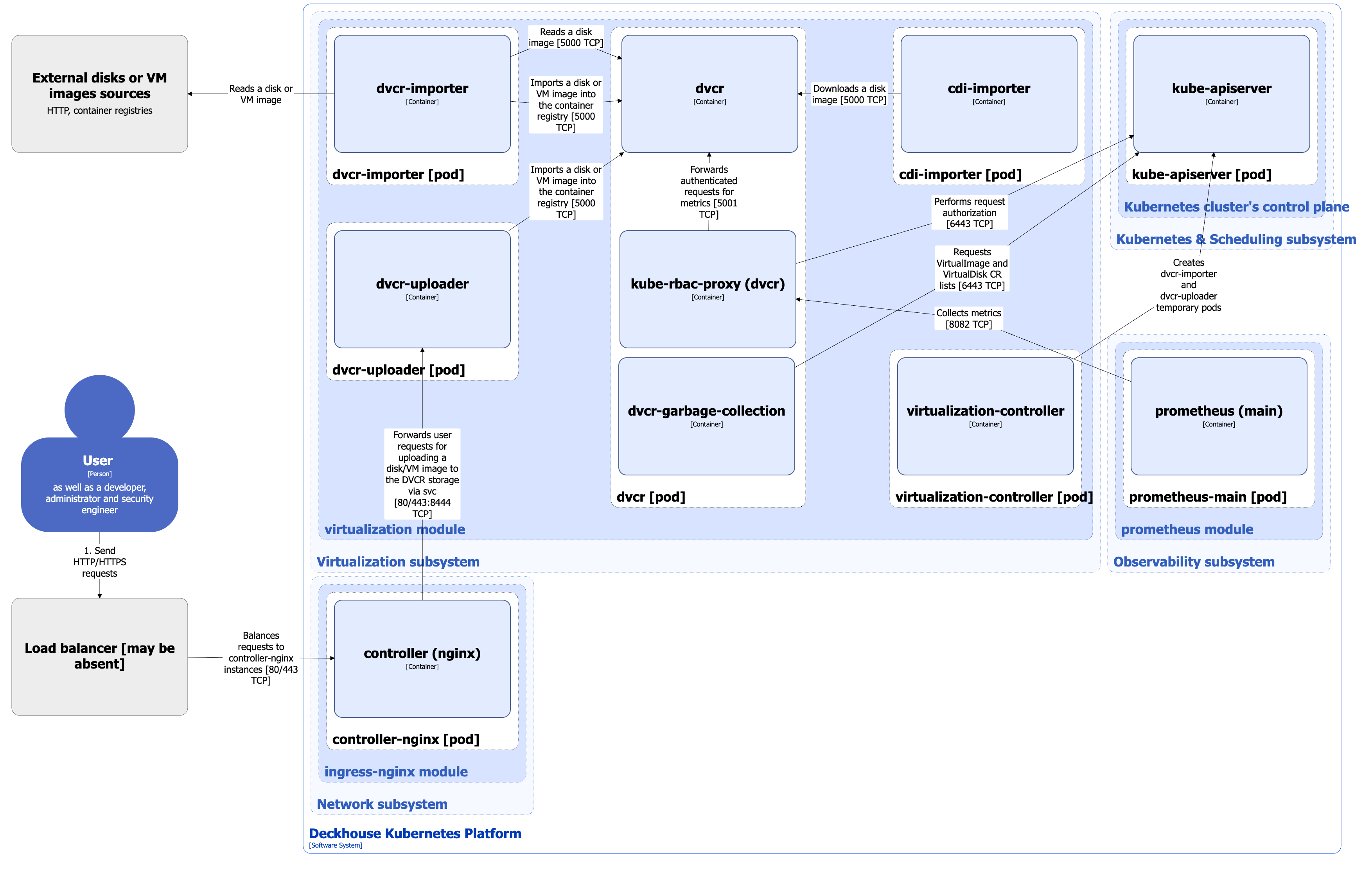
DVCR components
DVCR consists of the following components:
-
Dvcr: A container registry based on Distribution. Distribution is an open-source project that provides a framework for storing and distributing container images and other content using the OCI Distribution Specification. Dvcr is used for storing and caching VM images.
It consists of the following containers:
- dvcr: Main container.
- dvcr-garbage-collection: Sidecar container that periodically deletes images which do not have the appropriate resources in the cluster.
- kube-rbac-proxy: Sidecar container with an authorization proxy based on Kubernetes RBAC that provides secure access to the metrics of the dvcr container. It is an open-source project.
-
Dvcr-importer: Temporary pod that consists of a single container, run by the virtualization controller to implement various scenarios for importing VM images and disks, such as:
- Import of a VM disk or image from external sources (HTTP source available via URL or container registry) to the DVCR registry.
- Import of a VM image from external sources (HTTP source available via URL or container registry) into the PVC volume. Dvcr-importer does not directly import the disk into PVC volume. It uploads the source to the DVCR registry. Next, the InternalVirtualizationDataVolume resource is created, and then CDI imports the image from DVCR storage into PVC volume.
- Import of a VM image from VirtualImage, ClusterVirtualImage, VirtualDisk or VirtualDiskSnapshot resources to DVCR registry.
-
Dvcr-uploader: Temporary pod that consists of a single container, run by the virtualization controller to implement following scenarios for user to upload VM images and disks, such as:
- Upload to DVCR.
- Upload into PVC volume. Dvcr-uploader does not directly upload the disk into PVC volume. It uploads the source to the DVCR registry. Next, the InternalVirtualizationDataVolume resource is created, and then CDI imports the image from DVCR storage into PVC volume.
DVCR interactions
DVCR interacts with the following components:
- Kube-apiserver: Sends
get/list/watch-requests for VirtualImages, ClusterVirtualImages, and VirtualDisks to clean up unused images and for coordination. - External disks or VM images sources: Reads VM disks or images when implementing some scenarios of import to DVCR storage.
The following external components interact with the DVCR component:
- Virtualization-controller: Starts the dvcr-importer and dvcr-uploader pods to run scripts for VM disks and images import and download.
- Ingress-controller: Forwards user requests to upload a VM disk or image to the DVCR storage via the dvcr-uploader service HTTP endpoint.
- Cdi-importer: Uses images stored in DVCR as a source for InternalVirtualizationDataVolume resources.