Node load changes over time, and nodes sometimes fail. Deckhouse Platform (DP) balances the placement of virtual machines (VMs) across nodes and restarts machines from a failed node, while metrics help you find out why a machine runs slowly.
VM rebalancing
Over time, the distribution of virtual machines across nodes stops being even. The descheduler module restores the balance by moving VMs with live migration, without interrupting them. Enable this module, and the distribution is maintained without your involvement.
Rebalancing solves two tasks:
- It evens out the load. DP tracks how much CPU is reserved on each node and, when a node reserves more than 80%, moves some VMs to the nodes that reserve less than 50%.
- It restores correct placement. DP checks whether the current node meets the VM requirements and the rules of mutual VM placement. For example, if the rules forbid keeping certain VMs on the same node, the extra ones are moved.
DP sets the rebalancing parameters itself: with the descheduler module enabled, it creates a Descheduler resource named virtualization and selects in it only the machines that can be moved by live migration. How the eviction strategies work is covered in Pod eviction.
- Using the CLI
- Using the web interface
To view the rebalancing settings, run the following command:
d8 k get descheduler virtualization -o yaml
- Go to the System tab, then to Configuration → Deschedulers.
- Click Create.
- In the Create resource window that opens, enter the resource name in the Name field.
- On the Configuration tab, in the Strategies block, enable the strategies you need. The Low node utilization (balancing) strategy moves VMs from overloaded nodes, while Inter-Pod Anti-Affinity violations and Node Affinity violations restore correct placement.
- Click Apply.
The created resources and the strategies enabled in them appear in the list of the section.
Rebalancing covers only the VMs that can leave their node by live migration. A VM that can’t be live migrated, for example one with a passed-through device, is never moved by rebalancing, because the only other way off the node is a restart. Such a VM is restarted only during node maintenance and only with the permission of an administrator.
Diagnosing a slow VM
A slowdown of a virtual machine has two different causes. The guest OS is either busy with its own computations, or waiting for the node to give it processor time. From the outside both cases look the same, as a loaded processor of the machine.
DP metrics tell them apart, so you don’t have to log in to the guest system. The “Virtualization VM Happiness” Grafana dashboard shows how long each machine waits for a processor and what it lacks, as well as which nodes are loaded more than the rest.
What to do next depends on which of the causes is confirmed.
- The machine consumes its entire guaranteed processor share. Moving it to another node doesn’t help, because the same share is guaranteed there. Raise the core fraction
.spec.cpu.coreFractionor reduce the number of virtual cores, so that the guest OS doesn’t spread the load across the cores that get no processor time. With theAutovalue, DP picks the share from actual consumption, so you can’t change it manually and have to change the number of cores or set an explicit percentage. - The machine waits for processor time without consuming its guaranteed share. The node doesn’t deliver the declared guarantee, and moving the machine to a less loaded node eliminates the delays.
The guarantee isn’t absolute under CPU oversubscription. Processor time is distributed between machines in proportion to their shares, so a machine with a few loaded cores among many competing ones can get less than it’s guaranteed.
When freeing up a node, move the machine with the highest consumption rather than the one that has slowed down. Moving the main consumer frees the node resources, while moving the other machines has little effect.
Before a move, check whether migration is possible, so that freeing up a node doesn’t turn into a restart of a machine. A machine held by its storage is in many cases moved along with its disks, while a machine with a passed-through device can’t be moved by live migration at all.
Make sure as well that the cluster has a suitable node. The VirtualMachineClass limits the choice to the nodes whose processors match the class. If only the current node is left on that list, migration is impossible under any resource shortage, and what’s left is freeing up the node itself by moving the other machines off it, or assigning the machine a class with a wider choice of nodes.
DP measures storage and network latency by comparison with the rest of the cluster rather than against a fixed threshold, because the same disk latency is normal for a replicated volume and indicates a problem for a local one. If the storage is equally slow across the cluster, moving a machine doesn’t eliminate the delays.
ColdStandby
The ColdStandby mechanism returns a virtual machine to service after the failure of the node it was running on.
For the mechanism to work, meet two requirements:
- The
.spec.runPolicyrun policy of the virtual machine must be set toAlwaysOnUnlessStoppedManuallyorAlwaysOn. - The Fencing mechanism must be enabled on the nodes that run virtual machines.
Without Fencing, the mechanism doesn’t work. An unavailable VM doesn’t move in that case, but stays on the failed node and resumes together with it.
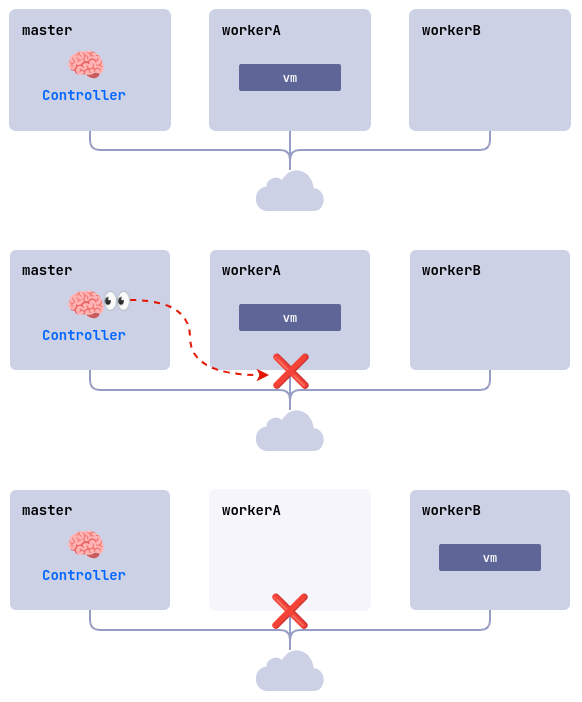
Here’s the recovery sequence, using a cluster of three nodes, master, workerA, and workerB, where Fencing is enabled on both worker nodes and the linux-vm VM runs on workerA:
- The
workerAnode fails, for example because of a power or network loss. - The controller checks node availability and finds that
workerAdoesn’t respond. - The controller removes
workerAfrom the cluster. - The
linux-vmVM starts on another suitable node,workerBin this example.