The CPU resources of a machine are defined by the number of cores and the core fraction, and the allowed combinations are limited by the virtual machine (VM) class.
Configuring CPU and coreFraction
Two parameters set the CPU resources of a machine. The .spec.cpu.cores parameter sets the number of virtual cores, and .spec.cpu.coreFraction sets the guaranteed share of the power of each of them.
spec:
  cpu:
    cores: 2
    coreFraction: 20%
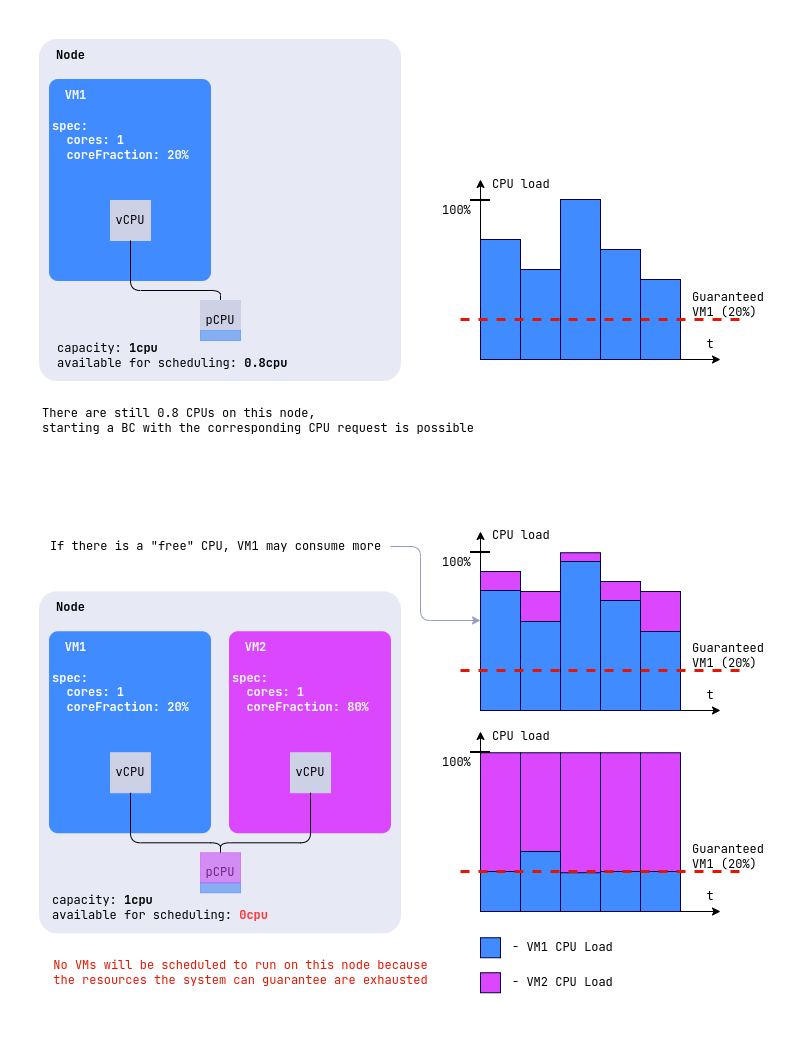
In this example, the machine gets two virtual cores and a guaranteed 20% of the power of each, that is, 0.4 cores in total, regardless of the node load. When the node has free resources, the machine can take both cores in full. Such a reserve lets you keep more machines on a node than it has physical cores, without losing stability under load.
If coreFraction isn’t set, each virtual core gets 100% of a physical one.
An administrator can restrict the set of allowed coreFraction values in the sizing policy of the VM class, and then you have to choose from them.
The guaranteed share is taken into account when selecting a node, so a machine doesn’t start where the node can’t provide the guarantees to all machines placed on it. The figure shows two machines with one core each, the first with coreFraction: 20% and the second with coreFraction: 80%.
Automatic coreFraction (Auto)
Deckhouse Platform (DP) can pick the CPU time share on its own, following how much the machine consumes.
The feature is available in commercial DP editions and is in the Alpha stage. It requires the enabled vertical-pod-autoscaler module, which picks the core fraction, and the HotplugCPUAndMemoryWithInPlaceResize feature in the module settings. The feature works with Kubernetes 1.33 or later, both on the control plane and on every node running VMs.
Instead of a fixed percentage, you can set coreFraction: Auto. Then DP picks the fraction, raising it when the machine lacks CPU and lowering it when the machine is idle. The number of cores and the amount of memory stay unchanged, and the new fraction applies without a restart.
spec:
  cpu:
    cores: 4
    coreFraction: Auto
The selection works as follows:
- A machine created with the
Autovalue starts at 10% or the nearest value allowed by the sizing policy, because a machine with no consumption history counts as idle. - A machine moved to
Autofrom a fixed percentage keeps its current share and waits there for the first recommendation, so the switch doesn’t reduce the guaranteed share. If the current share isn’t one of the steps, the nearest step above it applies, and only the 100% share is replaced with the nearest step below, because 100% is never selected automatically. - The fraction changes in steps. If the class sizing policy defines a
coreFractionslist, its values become the steps, otherwise 5%, 10%, 15%, 20%, 30%, 40%, 50%, 60%, 70%, 80%, 90%, and 99% are used. - The 100% value is never selected automatically, because at that value the CPU requests equal the limits, and such a machine can’t be changed without a restart. If 100% is listed in
coreFractions, it simply isn’t used, and the ceiling becomes the next value down, while without a sizing policy the ceiling is 99%. - For the same reason, the sizing policy has to leave at least two values to choose from. A policy that allows only 50%, or 50% and 100%, would pin the machine at 50% forever, so such a combination is rejected and you have to set the fraction explicitly.
- The recommended value is published in the
.status.recommendedResources.cpu.coreFractionfield, and the applied one in.status.resources.cpu.coreFraction. Every change is reported by theCoreFractionScalingevent. - If the node doesn’t have room for the new requests, the machine moves to another node and keeps running.
The CoreFractionAutoscaling condition shows whether the selection is running. While it works, the condition has the True status, and for the first few minutes, until statistics accumulate, the reason is WaitingForRecommendation, and then CoreFractionAutoscalingEnabled.
If the selection becomes unavailable, the condition switches to False, and the reason explains why:
CoreFractionAutoscalingDisabled: Vertical autoscaling is disabled.InPlaceResizeDisabled: In-place resource changes are disabled.SizingPolicyHasNoSteps: The sizing policy is narrowed down to a single value.
The machine keeps running with its current fraction, but stops following the load.
To opt out of automatic selection, set an explicit percentage. Switching between 100% and Auto in either direction requires a machine restart, because it changes the QoS class, and the other transitions apply on the fly.
Sizing policy
An administrator can restrict the resource combinations available to machines of a certain class by setting a sizing policy in the .spec.sizingPolicies parameter of the VirtualMachineClass resource. If there’s no policy, resources are set freely.
The policy splits the number of cores into ranges and sets the allowed amount of memory and the allowed coreFraction values for each of them:
spec:
  sizingPolicies:
    - cores:
        min: 1
        max: 4
      memory:
        min: 1Gi
        max: 8Gi
      coreFractions: [5, 10, 20, 50, 100]
    - cores:
        min: 5
        max: 8
      memory:
        min: 5Gi
        max: 16Gi
      coreFractions: [20, 50, 100]
With such a policy, a machine with two cores falls into the first range, gets from 1 to 8 GiB of memory and one of the values 5%, 10%, 20%, 50%, or 100%. A machine with six cores falls into the second range, where 5 to 16 GiB of memory is available and the core fraction is 20%, 50%, or 100%.
The policy also limits oversubscription. For example, the minimum value coreFraction: 20% guarantees each machine one fifth of a core, which means oversubscription doesn’t exceed 5 to 1.
If the machine configuration doesn’t match the policy, the SizingPolicyMatched condition with the False status appears in the status. Such a machine keeps running, but you can’t save changes to its configuration until the resources are brought in line with the policy. The same happens when an administrator changes the policy of a class whose machines are already running.
Besides the bounds, a range can set a grid step in the cores.step and memory.step parameters, and memory bounds per single core in the memory.perCore block.
A request that violates the policy is rejected with a message that names the parameter and the allowed values. Every message ends with the hint check the sizing policy of the VirtualMachineClass or contact the administrator for more information, which is omitted below.
For the supercpu class with the policy above, the messages look like this:
- the number of cores is outside all ranges,
cores: 10:does not match any sizing policy of VirtualMachineClass "supercpu": its 10 CPU core(s) fall outside the allowed ranges (1-4, 5-8); set the number of cores (spec.cpu.cores) accordingly; - an unsupported core fraction,
cores: 2andcoreFraction: 30%:the CPU core fraction "30%" is not allowed; set the core fraction (spec.cpu.coreFraction) to one of: 5%, 10%, 20%, 50%, 100%; - memory outside the range,
cores: 2andsize: 16Gi:the memory size (16Gi) is out of the range allowed by the sizing policy; set the memory size (spec.memory.size) between 1Gi and 8Gi.
If a range defines a step or per-core memory bounds, four more messages become possible:
- cores off the step grid:
the number of CPU cores (7) does not match the sizing policy step; set the number of cores (spec.cpu.cores) to 6 or 8; - memory off the step grid:
the memory size (1536Mi) does not match the sizing policy step; set the memory size (spec.memory.size) to 1Gi or 2Gi; - memory per core outside the range:
the memory size (18Gi) is not allowed for 6 CPU core(s); set the memory size (spec.memory.size) between 6Gi and 12Gi, or change the number of cores (spec.cpu.cores) (the sizing policy allows between 1Gi and 2Gi of memory per core); - memory per core off the step grid:
the memory size (2560Mi) does not match the per-core sizing policy step for 2 CPU core(s); set the memory size (spec.memory.size) to 2Gi or 4Gi, or change the number of cores (spec.cpu.cores).
When there are several violations, all the reasons are listed in one message under the does not match the sizing policy of VirtualMachineClass "supercpu" for several reasons: heading.
CPU topologies
The topology determines how the CPU cores of a machine are distributed across sockets, and compatibility with applications sensitive to the CPU configuration depends on it. You set only the total number of cores in the .spec.cpu.cores parameter, and DP calculates the number of sockets itself:
spec:
  cpu:
    cores: 20
The more cores there are, the more sockets they’re split across, and the larger the step with which you can change their number. The total number of cores has to be a multiple of the number of sockets, otherwise the request is rejected.
| Number of cores | Sockets | Multiple of | Cores per socket |
|---|---|---|---|
1 ≤ cores ≤ 16 |
1 | 1 | 1 to 16 |
16 < cores ≤ 32 |
2 | 2 | 9 to 16 |
32 < cores ≤ 64 |
4 | 4 | 9 to 16 |
64 < cores ≤ 248 |
8 | 8 | 9 to 31 |
For example, 20 cores give two sockets of 10 cores, and 80 cores give eight sockets of 10. The maximum for one machine is 248 cores and 1024 GB of memory.
DP publishes the calculated topology in the status:
status:
  resources:
    cpu:
      topology:
        coresPerSocket: 10
        sockets: 2
The memory overhead depends on the actually active cores and amounts to 8 MiB per logical core, that is, per the product of the number of sockets, cores per socket, and threads per core.