A virtual machine (VM) class defines which processor and which instruction set the guest system sees.
Virtual processor
The .spec.cpu block defines the CPU that the guest OS sees. It also determines which nodes a VM can migrate between.
The .spec.cpu block can’t be changed after the resource is created. To use a different CPU, create a new class.
The following examples cover each CPU type.
-
A set of CPU instructions required for a VM. Set with the
Featurestype:spec: cpu: features: - vmx type: FeaturesTo configure the vCPU in the web interface, in the VM class creation form:
- In the CPU settings block, select
Featuresin the Type field. - In the Required set of supported instructions field, select the instructions you need.
- Click Create.
- In the CPU settings block, select
-
A universal CPU for a given set of nodes. Set with the
Discoverytype:spec: cpu: discovery: nodeSelector: matchExpressions: - key: node-role.kubernetes.io/control-plane operator: DoesNotExist type: DiscoveryTo do the same in the web interface, in the VM class creation form:
- In the CPU settings block, select
Discoveryin the Type field. - Click Add in the Conditions for creating a universal CPU → Labels and expressions block.
- Set Key, Operator, and Value. They correspond to the
.spec.cpu.discovery.nodeSelectorparameter. - Press Enter to confirm the key parameters.
- Click Create.
- In the CPU settings block, select
-
A CPU close to the node CPU. Set with the
Hosttype. The guest OS gets almost the full instruction set of the node, so performance is higher than with a fixed model. A VM of this class migrates only between nodes with similar CPUs. For example, migration between nodes with Intel and AMD CPUs isn’t possible, and neither is migration between CPU generations with different instruction sets.spec: cpu: type: HostTo do the same in the web interface, in the VM class creation form:
- In the CPU settings block, select
Hostin the Type field. - Click Create.
- In the CPU settings block, select
-
The node CPU without changes. Set with the
HostPassthroughtype. A VM of this class migrates only to a node whose CPU exactly matches the CPU of the source node.spec: cpu: type: HostPassthroughTo do the same in the web interface, in the VM class creation form:
- In the CPU settings block, select
HostPassthroughin the Type field. - Click Create.
- In the CPU settings block, select
-
A specific CPU model with a known instruction set. Set with the
Modeltype. First, check which models the target node supports:d8 k get nodes <NODE_NAME> -o json | jq '.metadata.labels | to_entries[] | select(.key | test("cpu-model.node.virtualization.deckhouse.io")) | .key | split("/")[1]' -rWhere
<NODE_NAME>is the name of a cluster node.Example output:
Broadwell-noTSX
Broadwell-noTSX-IBRS
Haswell-noTSX
Haswell-noTSX-IBRS
IvyBridge
IvyBridge-IBRS
Nehalem
Nehalem-IBRS
Penryn
SandyBridge
SandyBridge-IBRS
Skylake-Client-noTSX-IBRS
Westmere
Westmere-IBRS
Then specify the selected model in the class specification:
spec:
  cpu:
    model: IvyBridge
    type: Model
To do the same in the web interface, in the VM class creation form:
- In the CPU settings block, select
Modelin the Type field. - In the Model field, select the CPU model.
- Click Create.
- In the CPU settings block, select
vCPU Discovery configuration example
The following example shows how to choose the processor types in a cluster with heterogeneous nodes.
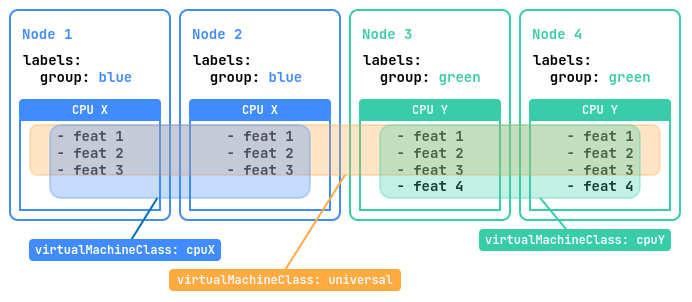
The example below uses a cluster of four nodes. Two nodes labeled group=blue are equipped with the “CPU X” processor with three instruction sets, and the other two labeled group=green have the newer “CPU Y” processor with four sets.
A CPU instruction set is every command the processor can execute, from addition to memory operations. The set determines which programs run and how fast, and it differs between CPU generations.
Three classes suit such a cluster:
universal: VMs start on any node and migrate between all four. Deckhouse Platform (DP) takes the instruction set common to both processors, so compatibility is maximal, while some capabilities of “CPU Y” stay unused.cpuX: VMs start only on nodes with “CPU X” and migrate between them, using all instructions of that processor.cpuY: The same for nodes with “CPU Y”.
The classes for such a cluster look as follows:
---
apiVersion: virtualization.deckhouse.io/v1alpha2
kind: VirtualMachineClass
metadata:
  name: universal
spec:
  cpu:
    # An empty discovery means that all cluster nodes are taken into account.
    discovery: {}
    type: Discovery
---
apiVersion: virtualization.deckhouse.io/v1alpha2
kind: VirtualMachineClass
metadata:
  name: cpuX
spec:
  cpu:
    discovery:
      nodeSelector:
        matchExpressions:
          - key: group
            operator: In
            values: ["blue"]
    type: Discovery
---
apiVersion: virtualization.deckhouse.io/v1alpha2
kind: VirtualMachineClass
metadata:
  name: cpuY
spec:
  cpu:
    discovery:
      nodeSelector:
        matchExpressions:
          - key: group
            operator: In
            values: ["green"]
    type: Discovery